<?xml version="1.0" encoding="utf-8"?>
<feed xmlns="http://www.w3.org/2005/Atom">
  <title>Java不加糖的Blog</title>
  
  <subtitle>Java不加糖的Blog</subtitle>
  <link href="http://blog.javazero.top/atom.xml" rel="self"/>
  
  <link href="http://blog.javazero.top/"/>
  <updated>2024-04-22T03:28:40.705Z</updated>
  <id>http://blog.javazero.top/</id>
  
  <author>
    <name>Java不加糖</name>
    
  </author>
  
  <generator uri="https://hexo.io/">Hexo</generator>
  
  <entry>
    <title>wireguard折腾记录</title>
    <link href="http://blog.javazero.top/2023/08/05/wireguard%E6%8A%98%E8%85%BE/"/>
    <id>http://blog.javazero.top/2023/08/05/wireguard%E6%8A%98%E8%85%BE/</id>
    <published>2023-08-05T15:12:33.000Z</published>
    <updated>2024-04-22T03:28:40.705Z</updated>
    
    <content type="html"><![CDATA[<h1 id="wireguard折腾记录">wireguard折腾记录</h1><ul><li><p>条件： 有一个动态公网ip的服务器(openwrt)，NameSilo域名+DDNS</p></li><li><p>需求：有两个局域网需要打通and有一个无公网ip的机器需要内网传统。</p></li></ul><h2 id="尝试两个wireguard服务器互联">尝试两个wireguard服务器互联</h2><p>两个服务器都安装wireguard，然后配置好服务器端和客户端，然后两个服务器互联，可以互相ping通。 用ipv6链接，盲猜校园网可以免流。</p><p>等等先</p><h2 id="解决动态公网ip变更后wireguard无法连接的问题">解决动态公网ip变更后wireguard无法连接的问题</h2><blockquote><p>自动重连、自动更新配置文件、自动更新域名解析</p></blockquote><blockquote><p>From: <a href="https://v2ex.com/t/863087">https://v2ex.com/t/863087</a></p></blockquote><p>官网上说是不会自动解析域名，所以配置里面EndPoint填的是域名也没有用。</p><blockquote><p>Endpoint with changing IP After resolving a server's domain, <strong>WireGuard will not check for changes in DNS again.</strong> If the WireGuard server is frequently changing its IP-address due DHCP, Dyndns, IPv6, etc., any WireGuard client is going to lose its connection, until its endpoint is updated via something like wg set "<span class="math inline">\(INTERFACE&quot; peer &quot;\)</span>PUBLIC_KEY" endpoint "$ENDPOINT". Also be aware, if the endpoint is ever going to change its address (for example when moving to a new provider/datacenter), just updating DNS will not be enough, so periodically running reresolve-dns might make sense on any DNS-based setup. Luckily, wireguard-tools provides an example script /usr/share/wireguard-tools/examples/reresolve-dns/reresolve-dns.sh, that parses WG configuration files and automatically resets the endpoint address. One needs to run the /usr/share/wireguard-tools/examples/reresolve-dns/reresolve-dns.sh /etc/wireguard/wg.conf periodically to recover from an endpoint that has changed its IP. One way of doing so is by updating all WireGuard endpoints once every thirty seconds[6] via a systemd timer:</p></blockquote><figure class="highlight bash"><table><tr><td class="gutter"><pre><span class="line">1</span><br></pre></td><td class="code"><pre><code class="hljs bash">git <span class="hljs-built_in">clone</span> https://git.zx2c4.com/wireguard-tools /usr/share/wireguard-tools<br></code></pre></td></tr></table></figure><figure class="highlight bash"><table><tr><td class="gutter"><pre><span class="line">1</span><br><span class="line">2</span><br><span class="line">3</span><br><span class="line">4</span><br><span class="line">5</span><br><span class="line">6</span><br><span class="line">7</span><br><span class="line">8</span><br><span class="line">9</span><br></pre></td><td class="code"><pre><code class="hljs bash"><span class="hljs-comment"># sudo vim /etc/systemd/system/wireguard_reresolve-dns.timer</span><br>[Unit]<br>Description=Periodically reresolve DNS of all WireGuard endpoints<br><br>[Timer]<br>OnCalendar=*:*:0/30<br><br>[Install]<br>WantedBy=timers.target<br></code></pre></td></tr></table></figure><figure class="highlight bash"><table><tr><td class="gutter"><pre><span class="line">1</span><br><span class="line">2</span><br><span class="line">3</span><br><span class="line">4</span><br><span class="line">5</span><br><span class="line">6</span><br><span class="line">7</span><br><span class="line">8</span><br><span class="line">9</span><br></pre></td><td class="code"><pre><code class="hljs bash"><span class="hljs-comment"># sudo vim /etc/systemd/system/wireguard_reresolve-dns.service</span><br>[Unit]<br>Description=Reresolve DNS of all WireGuard endpoints<br>Wants=network-online.target<br>After=network-online.target<br><br>[Service]<br>Type=oneshot<br>ExecStart=/bin/sh -c <span class="hljs-string">&#x27;for i in /etc/wireguard/*.conf; do /usr/share/wireguard-tools/contrib/reresolve-dns/reresolve-dns.sh &quot;$i&quot;; done&#x27;</span><br></code></pre></td></tr></table></figure><figure class="highlight bash"><table><tr><td class="gutter"><pre><span class="line">1</span><br></pre></td><td class="code"><pre><code class="hljs bash">sudo systemctl <span class="hljs-built_in">enable</span> wireguard_reresolve-dns.service wireguard_reresolve-dns.timer --now<br></code></pre></td></tr></table></figure>]]></content>


    <summary type="html">&lt;h1 id=&quot;wireguard折腾记录&quot;&gt;wireguard折腾记录&lt;/h1&gt;
&lt;ul&gt;
&lt;li&gt;&lt;p&gt;条件： 有一个动态公网ip的服务器(openwrt)，NameSilo域名+DDNS&lt;/p&gt;&lt;/li&gt;
&lt;li&gt;&lt;p&gt;需求：有两个局域网需要打通and有一个无公网ip的机器</summary>


    <category term="💾服务器" scheme="http://blog.javazero.top/categories/%F0%9F%92%BE%E6%9C%8D%E5%8A%A1%E5%99%A8/"/>
    
    
    <category term="分享" scheme="http://blog.javazero.top/tags/%E5%88%86%E4%BA%AB/"/>
    
    <category term="折腾" scheme="http://blog.javazero.top/tags/%E6%8A%98%E8%85%BE/"/>
    
    <category term="网络" scheme="http://blog.javazero.top/tags/%E7%BD%91%E7%BB%9C/"/>
    
  </entry>
  
  <entry>
    <title>DSB in SBG</title>
    <link href="http://blog.javazero.top/2023/06/25/DSB-in-SBG/"/>
    <id>http://blog.javazero.top/2023/06/25/DSB-in-SBG/</id>
    <published>2023-06-25T06:43:41.000Z</published>
    <updated>2024-04-22T03:28:40.705Z</updated>
    
    <content type="html"><![CDATA[<h1 id="diffusion-schrödinger-bridge-with-applications-to-score-based-generative-modeling-论文理解">《Diffusion Schrödinger Bridge with Applications to Score-Based Generative Modeling 》论文理解</h1><blockquote><p>Abstract翻译</p><p>逐步应用高斯噪声将复杂的数据分布转变为近似高斯的分布。逆转这一动态定义了一个生成模型。当正向噪声过程由随机微分方程（SDE）给出时，演示如何使用分数匹配来估计相关反向时间SDE的时间不均匀漂移。这种方法的局限性在于，正向时间SDE必须运行足够长的时间，以使最终分布近似于高斯，同时确保相应的时间微分误差得到控制。 相比之下，解决Bridge（SB）问题，即路径空间上的熵规整的最优传输问题，会产生扩散，在有限时间内从数据分布中产生样本。我们提出了扩散SB(DSB)，一个解决SB问题的迭代比例拟合(IPF)程序的原始近似，并提供了理论分析和生成模型的实验。第一个DSB迭代恢复了由WWDC提出的方法，并且可以灵活地使用较短的时间间隔，因为随后的DSB迭代减少了前向（或后向）SDE的最终时间边际与高斯先验（或数据）分布之间的差异。 除了生成模型，DSB还提供了一个计算上的最优传输工具，作为流行的Sinkhorn算法的连续状态空间类似物。</p></blockquote>]]></content>


    <summary type="html">&lt;h1 id=&quot;diffusion-schrödinger-bridge-with-applications-to-score-based-generative-modeling-论文理解&quot;&gt;《Diffusion Schrödinger Bridge with Applicati</summary>


  </entry>
  
  <entry>
    <title>ODE常微分方程总结</title>
    <link href="http://blog.javazero.top/2023/02/24/ODE%E5%B8%B8%E5%BE%AE%E5%88%86%E6%96%B9%E7%A8%8B%E6%80%BB%E7%BB%93/"/>
    <id>http://blog.javazero.top/2023/02/24/ODE%E5%B8%B8%E5%BE%AE%E5%88%86%E6%96%B9%E7%A8%8B%E6%80%BB%E7%BB%93/</id>
    <published>2023-02-24T10:54:11.000Z</published>
    <updated>2024-04-22T03:28:40.705Z</updated>
    
    <content type="html"><![CDATA[<iframe style="border-radius:12px" src="https://open.spotify.com/embed/track/0BRcn1RKWTKqF8OpdQmJXc?utm_source=generator" width="100%" height="352" frameBorder="0" allowfullscreen allow="autoplay; clipboard-write; encrypted-media; fullscreen; picture-in-picture" loading="lazy"></iframe><blockquote><p>教材：<a href="https://github.com/JavaZeroo/DLI-BSc-Mathematics-Documents/blob/main/y3s2/常微分方程/Ordinary%20Differential%20Equatrions.pdf">DLI-BSc-Mathematics-Documents/Ordinary Differential Equatrions.pdf at main · JavaZeroo/DLI-BSc-Mathematics-Documents (github.com)</a></p></blockquote><h1 id="第一章">第一章</h1><h2 id="explicit-first-order-equations">Explicit First Order Equations</h2><p>这种形式的 <span class="math display">\[y&#39; = f(x, y)\]</span> 称为 'Explicit First Order Equations' 。</p><h3 id="yfx"><span class="math inline">\(y&#39;=f(x)\)</span></h3><h3 id="equations-with-separated-variables">1. Equations with Separated Variables</h3><p><span class="math display">\[y&#39; = f(x)g(y)\]</span></p><p>这种可以直接变成 <span class="math inline">\(\frac{dy}{g(y)}=f(x)dx\)</span></p><p>积分完后 <span class="math display">\[\int\frac{dy}{g(y)}=\int f(x)dx\]</span> IVP: <span class="math inline">\(y(\xi)=\eta\)</span> <span class="math display">\[\int^y_{\eta}\frac{dy}{g(y)}=\int^x_{\xi} f(x)dx\]</span> 这里需要注意的是如果<span class="math inline">\(g(y(\xi))=g(\eta)=0\)</span> 那么，直接就有 <span class="math inline">\(y&#39;=0\)</span> 因此<span class="math inline">\(y=\eta\)</span> ;</p><h3 id="普通的替换">2. 普通的替换</h3><p><span class="math display">\[y&#39;=f(ax+by+c)\]</span></p><p>这种情况用<span class="math inline">\(u(x) = ax+by+c\)</span> 去替换掉变量<span class="math inline">\(x\)</span> 。原理是<span class="math inline">\(u&#39;=a+by&#39;(x)=a+bf(u)\)</span>。很关键的一点是，<span class="math inline">\(u\)</span> 和<span class="math inline">\(y\)</span> 都是一次的。求导后刚好是线性关系。</p><p>因此 最后得出的<span class="math inline">\(u(x)\)</span>后可以直接利用<span class="math inline">\(u(x)=ax+by+c\)</span>得到<span class="math inline">\(y\)</span>。</p><h3 id="普通的homogeneous-differential-equation">3. 普通的Homogeneous Differential Equation</h3><p><span class="math display">\[y&#39;=f\left(\frac{y}{x}\right)\]</span></p><p>同样的道理用<span class="math inline">\(u(x) = \frac{y(x)}{x}, (x\neq0)\)</span>替换掉变量<span class="math inline">\(y\)</span>。有<span class="math inline">\(y&#39;=u+xu&#39;=f(\frac{y}{x})\)</span> ，可得<span class="math inline">\(u&#39;=\frac{f(u)-u}{x}\)</span></p><p>因此 最后得出的<span class="math inline">\(u(x)\)</span>后可以直接利用<span class="math inline">\(u(x)=\frac{y(x)}{x}\)</span>得到<span class="math inline">\(y\)</span>。</p><h3 id="高级的-homogeneous-differential-equation">4. 高级的 Homogeneous Differential Equation</h3><p><span class="math display">\[y&#39;=f\left(\frac{ax+by+c}{\alpha x+\beta y+ \gamma}\right)\]</span></p><p>这个的核心思想是转换成“普通的Homogeneous Differential Equation”。</p><p>首先分析行列式 <span class="math display">\[\left | \begin{matrix}a       &amp;b      \\\alpha &amp;\beta    \\\end{matrix} \right | \]</span></p><ol type="1"><li>行列式为零时，说明<span class="math inline">\(a=\lambda_a \alpha, b=\lambda_b \beta\)</span> 此时 可以直接转换成“普通的Homogeneous Differential Equation”</li><li>行列式不为零的时候，说明方程组有唯一解。</li></ol><p>首先解方程组 <span class="math display">\[\left\{\begin{align}  ax+by+c&amp;=0\\  \alpha x+\beta y+ \gamma&amp;=0\\\end{align}\right.\]</span> 可以解出一组<span class="math inline">\((x_0, y_0)\)</span> 利用这组解将<strong>“高级的 Homogeneous Differential Equation”转换成“普通的Homogeneous Differential Equation”</strong>。</p><p>原理是新建坐标系得<span class="math inline">\(\bar{x}:=x-x_0, \bar{y}:=y-y_0\)</span> 那么在这个坐标系下面原方程就变成了<span class="math inline">\(\bar{y}(\bar{x}):=y(\bar{x}+x_0)-y_0\)</span>。对这个方程求导可以将<span class="math inline">\(y\)</span>消掉，将原问题变<span class="math inline">\(\bar{y}\)</span>和<span class="math inline">\(x\)</span>的关系。这样做的目的就是将<strong>“高级的 Homogeneous Differential Equation”转换成“普通的Homogeneous Differential Equation”</strong>。</p><p>对<span class="math inline">\(\bar{y}\)</span>求导后可以发现（利用方程<span class="math inline">\(\bar{y}(\bar{x}):=y(\bar{x}+x_0)-y_0, ax_0+by_0+c=0, \alpha x_0+\beta y_0+ \gamma=0\)</span>） <span class="math display">\[\frac{\bar{y}(x)}{d\bar{x}} = y&#39;(\bar{x}+x_0)=f\left(\frac{a\bar{x}+b\bar{y}(\bar{x})}{\alpha\bar{x}+\beta\bar{y}(\bar{x})}\right)\]</span> 这里就可以像刚才的<strong>普通的Homogeneous Differential Equation</strong>一样去做了。值得注意的是，这样解出来的<span class="math inline">\(\bar{y}\)</span>需要转换成原来的<span class="math inline">\(y\)</span>。这里可以用 <span class="math display">\[y(x):=y_0+\bar{y}(x-x_0)\]</span> 得到最后的<span class="math inline">\(y\)</span>。</p><h2 id="the-linear-differential-equation">The Linear Differential Equation</h2><p>这种形式的 <span class="math display">\[y&#39; + g(x)y=h(x)\]</span> 称为 'The Linear Differential Equation' 。</p><p>这时有<strong>两种</strong>情况：<span class="math inline">\(h(x)=0\)</span>和<span class="math inline">\(h(x)\neq0\)</span>， 分别称为"homogeneous" 和"nonhomogeneous"</p><p>事实上当<span class="math inline">\(h(x)=0\)</span>也就是"homogeneous"时，就是上面的"Explicit First Order Equations"，这里就不在赘述了。</p><p>对于<span class="math inline">\(h(x)\neq0\)</span>的情况，也就是"<strong>nonhomogeneous</strong>"时，我们需要用到"Method of variation of constants"。</p><p><strong>Method of variation of constants：</strong>这个方法首先计算出齐次的时候的通解。对于方程<span class="math inline">\(y&#39;+g(x)y=h(x)\)</span>他的齐次方程的通解是通过解<span class="math inline">\(y&#39;+g(x)y=0\)</span>，可得 <span class="math display">\[y=C\cdot e^{-\int g(x)dx}\]</span> 此时我们将常数<span class="math inline">\(C\)</span>作为一个与<span class="math inline">\(x\)</span>的函数<span class="math inline">\(C(x)\)</span>。这个时候，只需要解出一个<span class="math inline">\(C(x)\)</span>就是<strong>非齐次情况下的答案</strong>。</p><p>那么现在的问题就变成了，如何得到一个<span class="math inline">\(C(x)\)</span>使得<span class="math inline">\(y&#39; + g(x)y=h(x)\)</span>？</p><p>首先先计算<span class="math inline">\(C&#39;(x)\)</span> <span class="math display">\[\begin{align}y &amp;=C(x)\cdot e^{-\int g(x)dx}\\y&#39;&amp;=\left( C(x) \right)&#39;\cdot e^{-\int g(x)}+C(x)\cdot \left( e^{-\int g(x)dx }\right)&#39; \\y&#39;&amp;=C&#39;(x)\cdot e^{-\int g(x)}+C(x)\cdot \left( e^{-\int g(x)dx }\cdot\left(-\int g(x)\right)&#39;\right) \\y&#39;&amp;=C&#39;(x)\cdot e^{-\int g(x)}+C(x)\cdot \left( e^{-\int g(x)dx }\cdot -g(x)\right) \\&amp;\Downarrow \\y&#39;&amp;=C&#39;\cdot e^{-\int g(x)}-gC\cdot e^{-\int g(x)dx}\end{align}\]</span> 然后代入<span class="math inline">\(y&#39; + g(x)y=h(x)\)</span> <span class="math display">\[\begin{align}L_y \equiv y&#39; + g(x)y&amp;=h(x)\\L_y&amp;=C&#39;\cdot e^{-\int g(x)dx}-gC\cdot e^{-\int g(x)dx}+gC\cdot e^{-\int g(x)dx}\\L_y&amp;=C&#39;\cdot e^{-\int g(x)dx}=h(x) \\&amp;\Downarrow \\C&#39;(x)&amp;=h(x)\cdot e^{\int g(x)dx} \\&amp;\Downarrow \\C(x)&amp;=\int h(x)\cdot e^{\int g(x)dx}dx + C_0\end{align}\]</span> 现在我们可以知道，当<span class="math inline">\(y=C(x)\cdot e^{-\int g(x)dx}\)</span>且<span class="math inline">\(C(x)=\int h(x)\cdot e^{\int g(x)dx} + C_0\)</span>时。，有<span class="math inline">\(y&#39; + g(x)y=h(x)\)</span>。这里有个二级结论</p><blockquote><p>If <span class="math inline">\(y, \bar{y}\)</span>, yare two solutions to the nonhomogeneous equation <span class="math inline">\(L_y = h\)</span>, then <span class="math inline">\(L(y - y) = L_y - L_{\bar{y}} = 0, i.e., z(x) = y - \bar{y}\)</span> is a solution of the homogeneous equation <span class="math inline">\(L_y = 0\)</span>. Thus all solutions <span class="math inline">\(y(x)\)</span> of the nonhomogeneous equation can be written in the form <span class="math display">\[y(x)=\bar{y}+z(x)\]</span></p></blockquote><p>这里面<span class="math inline">\(z(x)\)</span>就是刚刚的<span class="math inline">\(y=C\cdot e^{-\int g(x)dx}\)</span>，<span class="math inline">\(\bar{y}\)</span>就是<span class="math inline">\(C(x)=\int h(x)\cdot e^{\int g(x)dx} + C_0\)</span>和<span class="math inline">\(y=C\cdot e^{-\int g(x)dx}\)</span>的结合中的<span class="math inline">\(y\)</span>，也就是<span class="math inline">\(\bar{y}=\left(\int h(x)\cdot e^{\int g(x)dx}dx + C_0\right)\cdot e^{-\int g(x)dx}\)</span></p><h3 id="bernoullis-equation">Bernoulli's Equation</h3><p>这种形式的 <span class="math display">\[y&#39;+g(x)y+h(x)y^{\alpha}=0.\alpha \neq 1\]</span> 非常的简单，只需要把<span class="math inline">\(y^{\alpha}\)</span>解决了就可以了。等式去除<span class="math inline">\(y^{\alpha}\)</span>有 <span class="math display">\[y&#39;y^{-\alpha}+g(x)y^{(1-\alpha)}+h(x)=0\]</span> 利用<span class="math inline">\(z=y^{(1-\alpha)} \implies z&#39;=(1-\alpha)y^{-\alpha}\cdot y&#39;\)</span>替换原式得 <span class="math display">\[\frac{1}{1-\alpha}z&#39;+g(x)z+h(x)=0\]</span> 现在，就变成了nonhomogeneous的"The Linear Differential Equation"。最后解出<span class="math inline">\(z\)</span>，别忘了替换回<span class="math inline">\(y\)</span>。</p><h3 id="exact-differential-equations">Exact differential equations</h3><p>这种形式的 <span class="math display">\[M(x,y)dx+N(x,y)dy=0,\\ \exists\ U(x, y)\ s.t.\ U_x(x,y)=M(x,y),U_y(x,y)=N(x,y)\]</span></p><blockquote><p><span class="math inline">\(xdx+ydy=0\)</span> is an exact equation, and <span class="math inline">\(U(x,y)=1/2 (x^2+y^2 )\)</span>is a potential function.</p></blockquote><h3 id="integrating-factors">Integrating Factors</h3><p>Integrating Factors是用来让非 Exact 变成Exact differential equations。</p><blockquote><p><strong>E.g</strong>. <span class="math inline">\(ydx + 2xdy = 0\)</span> is not exact. However, it can easily be made an exact differential equation (in the domain <span class="math inline">\(x &gt; 0\)</span>) by multiplying the equation by <span class="math inline">\(1/\sqrt{x}\)</span>. The resulting differential equation <span class="math display">\[\frac{y}{\sqrt{x}}dx+2\sqrt{x}dy=0\]</span> is exact, and a potential function is given by <span class="math display">\[F(x,y)=2y\sqrt{x}=0\ (x&gt;0)\]</span></p></blockquote><p>对于一个not excat differential equation我们需要找到一个Factor <span class="math inline">\(U(x,y)\)</span> 使得<span class="math inline">\(U(x,y)\cdot M(x,y)dx+U(x,y)\cdot N(x,y)dy=0\)</span>变成一个Exact differential equations。</p><div class="note note-info">            <p>这里有一个"<strong>Theorem on potential functions</strong>"保证可以找到<span class="math inline">\(U(x,y)\)</span></p>          </div><p>现在的问题就是，如何去找？首先令<span class="math inline">\(M&#39; = U\cdot M,N&#39;=U\cdot N\)</span>如果<span class="math inline">\(F_x=M&#39;,F_y=N&#39;\)</span>则有<span class="math inline">\(M&#39;_y=N&#39;_x\)</span>。利用这个关系可以知道 <div class="note note-info">            <p>事实上就是<span class="math inline">\(F_{xy}=F_{yx}\)</span> (Jacobian Matrix)</p>          </div> <span class="math display">\[\begin{align}&amp;(U\cdot M)_y=(U\cdot N)_x\\\implies &amp;U_y\cdot M+U\cdot M_y=U_x\cdot N+U\cdot N_x \\\end{align}\]</span> 此时需要考虑，Integrating Factors是只与<span class="math inline">\(x\)</span>有关还是只与<span class="math inline">\(y\)</span>有关（只需要选一个）</p><ol type="1"><li>假如只与<span class="math inline">\(x\)</span>有关则<span class="math inline">\(U_y=0\)</span>则有</li></ol><p><span class="math display">\[\begin{align}U_y\cdot M+U\cdot M_y&amp;=U_x\cdot N+U\cdot N_x \\U\cdot M_y &amp;= U&#39; \cdot N+U \cdot N_x \\\frac{1}{U}U&#39;&amp;=\frac{M_y-N_x}{N} \\(\ln U)&#39;&amp;=\frac{M_y-N_x}{N} \\U&amp;=e^{\int \frac{M_y-N_x}{N}dx}\end{align}\]</span> <div class="note note-info">            <p>这里的答案不是<span class="math inline">\(U=C\cdot e^{\int \frac{M_y-N_x}{N}dx}\)</span>的原因是，我们只需要找到一个<span class="math inline">\(U\)</span>，因此你可以认为我们选择<span class="math inline">\(C=1\)</span>作为答案。下面的情况同理。</p>          </div></p><ol start="2" type="1"><li>假如只与<span class="math inline">\(y\)</span>有关则<span class="math inline">\(U_x=0\)</span>则有</li></ol><p><span class="math display">\[\begin{align}U_y\cdot M+U\cdot M_y&amp;=U_x\cdot N+U\cdot N_x \\U&#39;\cdot M+U\cdot M_y &amp;= U \cdot N_x \\\frac{1}{U}U&#39;&amp;=\frac{N_x-M_y}{M} \\(\ln U)&#39;&amp;=\frac{N_x-M_y}{M} \\U &amp;=e^{\int \frac{N_x-M_y}{M}}\end{align}\]</span></p><h3 id="implicit-first-order-differential-equations">Implicit First Order Differential Equations</h3><p>这种形式的 <span class="math display">\[F(x, y, y&#39;)=0\]</span> 一般来说有两种解决办法。要么通过一些方法获得explicit differential equation，要么就用参数化。</p><p>在这里我们只讨论两种情况：</p><ol type="1"><li>$F(x, y')=0 $, <span class="math inline">\(F(y, y&#39;)=0\)</span></li><li><span class="math inline">\(y=f(x,y&#39;)\)</span>, <span class="math inline">\(x=f(y,y&#39;)\)</span></li></ol><h4 id="第一种情况">第一种情况</h4>对于$F(x, y')=0 $我们使用参数化： <span class="math display">\[\left\{\begin{array}{l}x=\phi(t) \\y&#39;=\psi(t)\end{array}\right.\]</span> 此时方程变为<span class="math inline">\(F(\phi(t), \psi(t))=0\)</span>，同时我们有 $$ <span class="math display">\[\begin{align}y&#39;&amp;=\frac{dy}{dx} \ \text{and} \ \phi&#39;(t)=\frac{d\phi(t)}{dt} \\dy&amp;=y&#39;dx \ \ \text{and} \ d\phi(t)=\phi&#39;(t)dt\\ y&amp;=\int y&#39;dx + C\\y&amp;=\int \psi(t)d\phi(t) + C \\y&amp;=\int \psi(t)\phi&#39;(t)dt +C\end{align}\]</span> <span class="math display">\[最后得到：\]</span> {<span class="math display">\[\begin{array}{l}x=\phi(t) \\y=\int \psi(t)\phi&#39;(t)dt +C\end{array}\]</span><p>. $$</p><h4 id="第一种情况2">第一种情况2</h4><p>对于<span class="math inline">\(F(y,y&#39;)=0\)</span>我们仍然参数化： <span class="math display">\[\left\{\begin{array}{l}y=\phi(t) \\y&#39;=\psi(t)\end{array}\right.\]</span> 此时有<span class="math inline">\(F(\phi(t),\psi(t)=0\)</span>，同时有： <span class="math display">\[\begin{align}y&#39;&amp;=\frac{dy}{dx} \ \text{and} \ \phi&#39;(t)=\frac{dy}{dt} \\dx&amp;=\frac{dy}{\psi(t)} \ \text{and} \ dy=\phi&#39;(t)dt \\dx&amp;=\frac{\phi&#39;(t)dt}{\psi(t)} \\\int dx&amp;= \int \frac{\phi&#39;(t)dt}{\psi(t)} \\x&amp;=\int \frac{\phi&#39;(t)dt}{\psi(t)}\end{align}\]</span></p><h2 id="an-existence-and-uniqueness-theorem">An Existence and Uniqueness Theorem</h2><p>中文名是<strong>存在唯一性定理</strong>。首先我们介绍<em>Lipschitz condition</em>:</p><blockquote><p>We consider the following initial value problem <span class="math display">\[y&#39; = f(x,y),\ \text{for}\ \xi \leq x\leq \xi+a,\ y(\xi)=\eta\]</span> The main assumptions in the following theorem are that <span class="math inline">\(f\)</span> is continuous in the strip <span class="math inline">\(S=J\times\mathbb{R}\)</span> with <span class="math inline">\(J=[\xi,\xi+a]\)</span> and satisfies a <em>Lipschitz condition with respect to <span class="math inline">\(y\)</span></em> in <span class="math inline">\(S\)</span> <span class="math display">\[|f(x,y)-f(x, \bar{y})|\leq L|y-\bar{y}|\]</span> No restrictions are placed on the value of the <em>Lipschitz constant</em> <span class="math inline">\(L\geq 0\)</span></p></blockquote><p>然后引出存在唯一性定理：</p><blockquote><p>Let <span class="math inline">\(f \in C(S)\)</span> satisfy the <em>Lipschitz condition</em>. Then the IVP has exactly one solution <span class="math inline">\(y(x)\)</span>. The solution exists in the interval <span class="math inline">\(J: \xi\leq x \leq\xi +a\)</span></p></blockquote><h2 id="the-extension-of-solutions."><strong>The extension of solutions.</strong></h2><p>以下三个定理是用于 <strong>The extension of solutions.</strong></p><blockquote><p>1️⃣<strong>Local Lipschitz condition.</strong> The function <span class="math inline">\(f(x,y)\)</span> is said to satisfy a local Lipschitz condition with respect to <span class="math inline">\(y\)</span> in <span class="math inline">\(D\subset R^2\)</span> if for every <span class="math inline">\((x_0,y_0 )\in D\)</span> there exists a neighborhood <span class="math inline">\(U=U(x_0,y_0 )\)</span> and an <span class="math inline">\(L=L(x_0,y_0 )\)</span> such that in <span class="math inline">\(U\cup D\)</span> the function <span class="math inline">\(f\)</span> satisfies the Lipschitz condition <span class="math inline">\(|f(x,y)-f(x,\bar{y})|\leq L|y-\bar{y}|\)</span>.</p></blockquote><div class="note note-info">            <p>注意！我们一般通过连续性来判断Local Lipschitz condition</p><blockquote><p>If <span class="math inline">\(D\)</span> is open and if <span class="math inline">\(f \in C(D)\)</span> has a continuous derivative <span class="math inline">\(f_y\)</span> in <span class="math inline">\(D\)</span>, then f satisfies a <strong>local Lipschitz condition</strong> in this set.</p></blockquote>          </div><blockquote><p>2️⃣<strong>Theorem on local solvability</strong> If <span class="math inline">\(D\)</span> is open and <span class="math inline">\(f\in C(D)\)</span> satisfies a local Lipschitz condition in <span class="math inline">\(D\)</span>, then the IVP is locally uniquely solvable for$ (x_0,y_0 )∈D$; i.e., there is a neighborhood <span class="math inline">\(I\)</span> of$ x_0$ such that exactly one solution exists in <span class="math inline">\(I\)</span>.</p></blockquote><blockquote><p>3️⃣<strong>Theorem on the extension of solutions</strong> Let <span class="math inline">\(f \in C (D)\)</span> satisfy a local Lipschitz condition with respect to <span class="math inline">\(y\)</span> in <span class="math inline">\(D\)</span>. Then for every <span class="math inline">\((x_0, y_0)\in D\)</span> the initial value problem <span class="math inline">\(y&#39; = f (x, y), y(x_0) = y_0\)</span> has a solution that can be extended to the left and to the right comes arbitrarily close to the boundary of <span class="math inline">\(D\)</span>.</p></blockquote><p>最后我们有：</p><blockquote><p><strong>The Peano existence theorem.</strong> If <span class="math inline">\(f(x,y)\)</span> is continuous in a domain <span class="math inline">\(D\)</span> and <span class="math inline">\((\xi,\eta)\)</span> is a point in <span class="math inline">\(D\)</span>, then at least one solution of the differential equation <span class="math inline">\(y′=f(x,y)\)</span> goes through <span class="math inline">\((\xi,\eta)\)</span>. Every solution can be extended to the left and to the right up to the boundary of <span class="math inline">\(D\)</span>.</p></blockquote><h2 id="linear-system">Linear System</h2><p>这里开始就是在讨论，常微分方程组。</p><h3 id="systems-of-n-linear-differential-equations">Systems of n Linear Differential Equations</h3><p>给出常微分方程组的形式： $$ <span class="math display">\[\begin{align}y_1&#39; &amp;= a_{11}(t)y_1+\cdots+ a_{1n}(t)y_n+b_1(t) \\&amp;\ \ \vdots \\y_1&#39; &amp;= a_{11}(t)y_1+\cdots+a_{1n}(t)y_n+b_1(t) \\\end{align}\]</span> <span class="math display">\[或者：\]</span> '=A(t)+(t)\  \ A(t)=(a_{ij}(t)), (t)=(b_1(t), , b_n(t))^ $$ 值得一提的是，存在唯一性定理在常微分方程组也同样适用。</p><h3 id="homogeneous-linear-systems">Homogeneous Linear Systems</h3><p>对于齐次的形式，常微分方程组就变成了： <span class="math display">\[\mathbf{y}&#39;=A(x)\mathbf{y}\]</span> 此时，根据存在唯一性定理有： <span class="math display">\[\exist \text{ exactly one solution } \mathbf{y}=\mathbf{y}(t;\tau,\boldsymbol{\eta})\ \forall \tau \in J, \boldsymbol{\eta}\in \R^n\text{ or }\C^n\]</span> 当然，齐次常微分方程组有一些重要的性质：</p><ol type="1"><li>$  $ in $ J$ is a solution of the <strong>homogeneous linear systems</strong>.</li><li>There exist <span class="math inline">\(n\)</span> linearly independent solutions <span class="math inline">\(_1,\dots,\mathbf{y}_n\)</span>. Every such set of <span class="math inline">\(n\)</span> linearly independent solutions is called a <strong>fundamental system of solutions</strong>. If <span class="math inline">\(\mathbf{y}_1,\dots,\mathbf{y}_n\)</span> is a fundamental system, then every solution <span class="math inline">\(\mathbf{y}\)</span> can be written in a unique way as a linear combination <span class="math inline">\(\mathbf{y}=C_1 \mathbf{y}_1+\dots+C_n \mathbf{y}_n\)</span>.</li><li>A system of <span class="math inline">\(n\)</span> solutions <span class="math inline">\(\mathbf{y}_1,…,\mathbf{y}_n\)</span> can be assembled into an <span class="math inline">\(n\times n\)</span> solution matrix <span class="math inline">\(\Phi(x)=(\mathbf{y}_1,\dots,\mathbf{y}_n )\)</span>. If <span class="math inline">\(n\)</span> solutions <span class="math inline">\(\mathbf{y}_1,\dots,\mathbf{y}_n\)</span> are linearly independent, then <span class="math inline">\(\Phi(x)\)</span> is a system of <span class="math inline">\(n\)</span> solutions <span class="math inline">\(\mathbf{y}_1,\dots,\mathbf{y}_n\)</span> can be assembled into an <span class="math inline">\(n\times n\)</span> solution matrix <span class="math inline">\(\Phi(x)=(\mathbf{y}_1,\dots,\mathbf{y}_n )\)</span>. If <span class="math inline">\(n\)</span> solutions <span class="math inline">\(\mathbf{y}_1,\dots,\mathbf{y}_n\)</span> are linearly independent, then <span class="math inline">\(\Phi(x)\)</span>is a <strong>Fundamental Matrix.</strong></li></ol><h4 id="the-wronskian"><strong>The Wronskian</strong></h4><p>现在讨论一下，齐次常微分方程的解，是线性无关还是线性相关。</p><ul><li><p><strong>The Wronskian.</strong> If <span class="math inline">\(\Phi(x)=(\mathbf{y}_1,\dots,\mathbf{y}_n )\)</span> is a solution matrix of <span class="math inline">\(\mathbf{y}^′=A(x)\mathbf{y}\)</span>, then its determinant <span class="math inline">\(W(x)=|\Phi(x)|\)</span>is called the Wronskian determinant.</p></li><li><p><strong>Theorem</strong> If <span class="math inline">\(\mathbf{y}_1,\dots,\mathbf{y}_n\)</span> are linearly dependent in <span class="math inline">\(J\)</span>, then the Wronskian <span class="math inline">\(W(x)\equiv0\)</span>.</p></li><li><p><strong>Theorem</strong> If <span class="math inline">\(\mathbf{y}_1,…,\mathbf{y}_n\)</span> is a fundamental system of equation <span class="math inline">\(\mathbf{y}&#39;=A(x)\mathbf{y}\)</span>, then the Wronskian <span class="math inline">\(W(x)\neq0\)</span> in <span class="math inline">\(J\)</span>.</p></li><li><p><strong>Theorem.</strong> There exists a fundamental system of solutions for equation <span class="math inline">\(\mathbf{y}&#39;=A(x)\mathbf{y}\)</span>.</p></li></ul><p>因此，我们先求出<span class="math inline">\(n\)</span>个解，然后再去判断这<span class="math inline">\(n\)</span>个解的<strong>Fundamental Matrix</strong>的行列式，也就是<strong>The Wronskian</strong>，是否为零。</p><h3 id="inhomogeneous-systems"><strong>Inhomogeneous Systems</strong></h3><p>对于非齐次的常微分方程组，就是最开始样子： <span class="math display">\[\mathbf{y}&#39;=A(t)\mathbf{y}+\mathbf{b}(t)\]</span> 下面这个定理类似线性代数，非齐次方程组的通解是，齐次方程组的通解+非齐次方程组的特解：</p><ul><li><strong>Theorem.</strong> Let <span class="math inline">\(\tilde{\mathbf{y}}(x)\)</span>be a fixed solution of the inhomogeneous equation (1). If <span class="math inline">\(\mathbf{y}_0 (x)\)</span> is an arbitrary solution of the homogeneous equation, then <span class="math inline">\(\mathbf{y}(x)=\tilde{\mathbf{y}}(x)+\mathbf{y}_0 (x)\)</span>is a solution of the inhomogeneous equation, and all solutions of the inhomogeneous equation are obtained in this way.</li></ul>]]></content>


    <summary type="html">&lt;iframe style=&quot;border-radius:12px&quot; src=&quot;https://open.spotify.com/embed/track/0BRcn1RKWTKqF8OpdQmJXc?utm_source=generator&quot; width=&quot;100%&quot; heigh</summary>


    <category term="📝学习" scheme="http://blog.javazero.top/categories/%F0%9F%93%9D%E5%AD%A6%E4%B9%A0/"/>
    
    
    <category term="数学" scheme="http://blog.javazero.top/tags/%E6%95%B0%E5%AD%A6/"/>
    
  </entry>
  
  <entry>
    <title>Windows分应用跳过管理员弹窗</title>
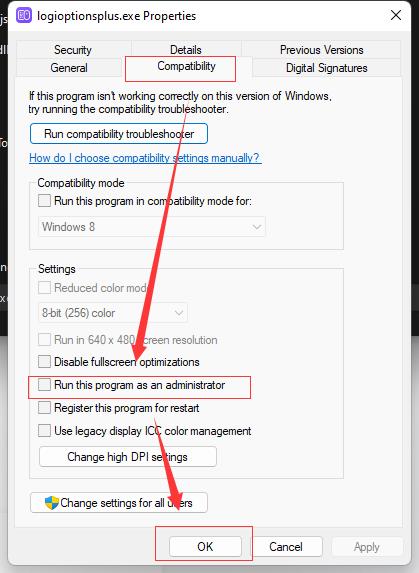
    <link href="http://blog.javazero.top/2022/11/15/Windows%E5%88%86%E5%BA%94%E7%94%A8%E8%B7%B3%E8%BF%87%E7%AE%A1%E7%90%86%E5%91%98%E5%BC%B9%E7%AA%97/"/>
    <id>http://blog.javazero.top/2022/11/15/Windows%E5%88%86%E5%BA%94%E7%94%A8%E8%B7%B3%E8%BF%87%E7%AE%A1%E7%90%86%E5%91%98%E5%BC%B9%E7%AA%97/</id>
    <published>2022-11-15T12:54:21.000Z</published>
    <updated>2024-04-22T03:28:40.705Z</updated>
    
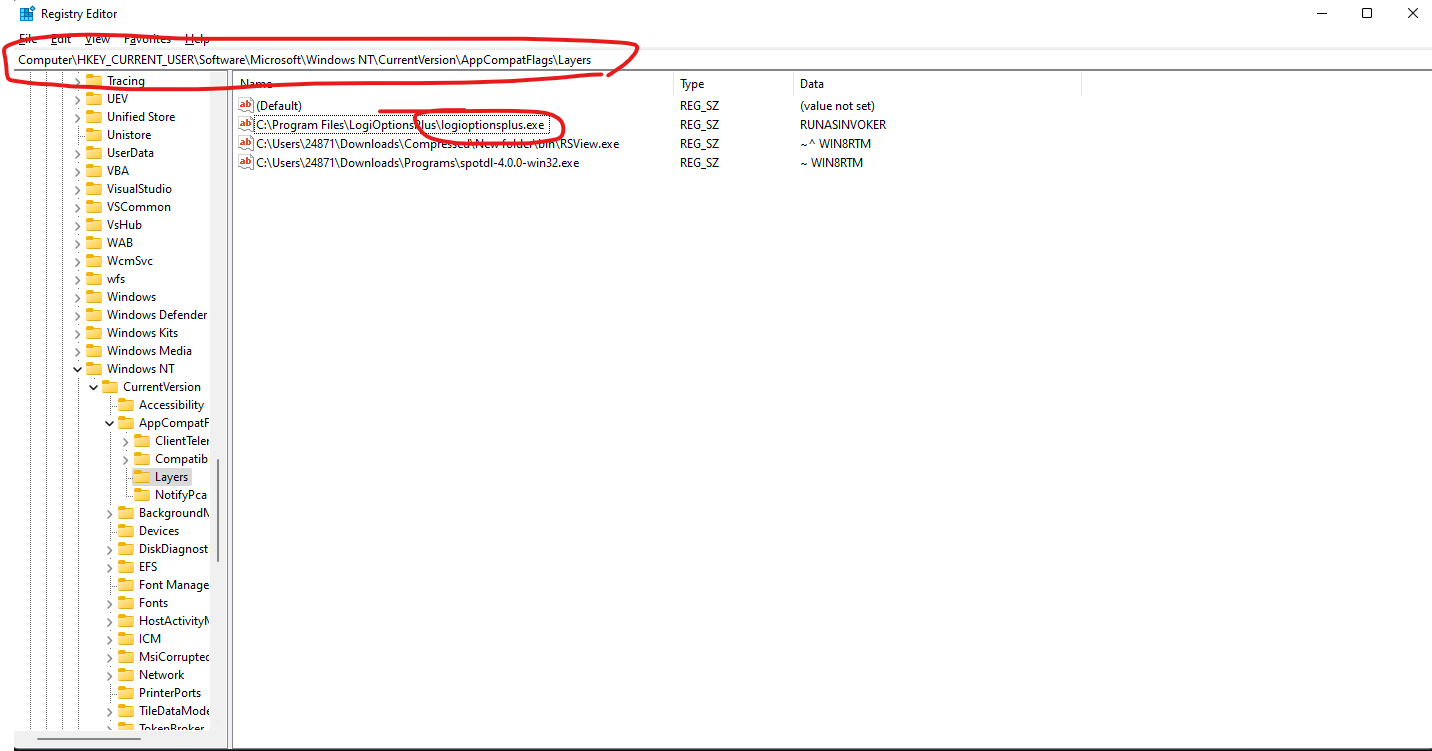
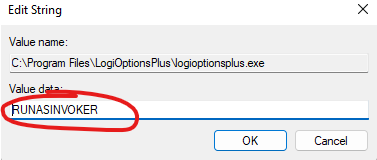
    <content type="html"><![CDATA[<iframe style="border-radius:12px" src="https://open.spotify.com/embed/track/5K5Yo96RucQFgZ2FGFdgSQ?utm_source=generator" width="100%" height="152" frameBorder="0" allowfullscreen allow="autoplay; clipboard-write; encrypted-media; fullscreen; picture-in-picture" loading="lazy"></iframe><h2 id="程序设置管理员启动">程序设置管理员启动</h2><p>右键exe文件-&gt;属性</p><figure><img src="/images/管理员/软件设置.jpg" alt="程序设置管理员启动" /><figcaption aria-hidden="true">程序设置管理员启动</figcaption></figure><div class="note note-warn">            <p><strong>把程序打开一次后关闭</strong>（这个时候还会有弹窗是正常的，别急😠）</p>          </div><h2 id="进入注册表">进入注册表</h2><p>摁住<kbd>Win</kbd>+<kbd>R</kbd>，输入<code>regedit</code>打开注册表编辑器</p><figure><img src="/images/管理员/注册表编辑.png" alt="注册表编辑" /><figcaption aria-hidden="true">注册表编辑</figcaption></figure><p>在<code>Computer\HKEY_CURRENT_USER\Software\Microsoft\Windows NT\CurrentVersion\AppCompatFlags\Layers</code>下面找到<strong>对应的程序</strong>，然后修改程序的数值为<code>RUNASINVOKER</code></p><figure><img src="/images/管理员/编辑值.png" alt="编辑值" /><figcaption aria-hidden="true">编辑值</figcaption></figure><p>再次打开软件就不会有弹窗了。</p>]]></content>


    <summary type="html">&lt;iframe style=&quot;border-radius:12px&quot; src=&quot;https://open.spotify.com/embed/track/5K5Yo96RucQFgZ2FGFdgSQ?utm_source=generator&quot; width=&quot;100%&quot; heigh</summary>


    <category term="💻Windows" scheme="http://blog.javazero.top/categories/%F0%9F%92%BBWindows/"/>
    
    
    <category term="分享" scheme="http://blog.javazero.top/tags/%E5%88%86%E4%BA%AB/"/>
    
  </entry>
  
  <entry>
    <title>docker配置wikijs</title>
    <link href="http://blog.javazero.top/2022/11/06/docker%E9%85%8D%E7%BD%AEwikijs/"/>
    <id>http://blog.javazero.top/2022/11/06/docker%E9%85%8D%E7%BD%AEwikijs/</id>
    <published>2022-11-06T07:14:22.000Z</published>
    <updated>2024-04-22T03:28:40.705Z</updated>
    
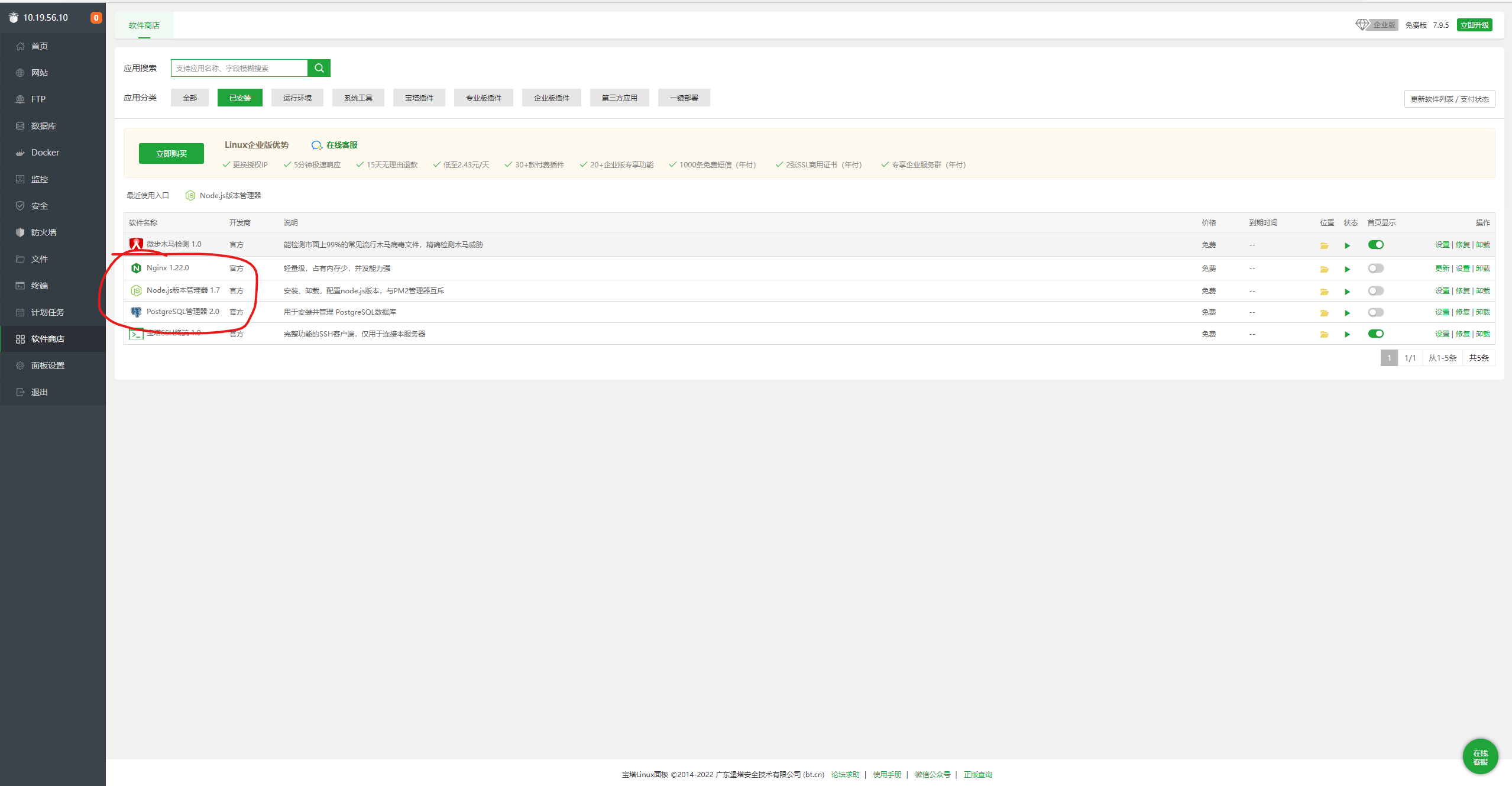
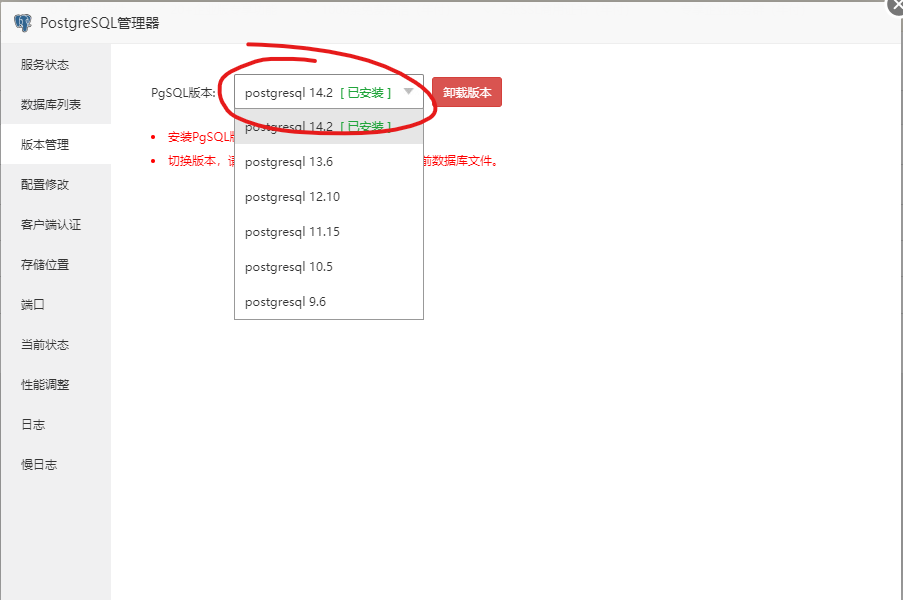
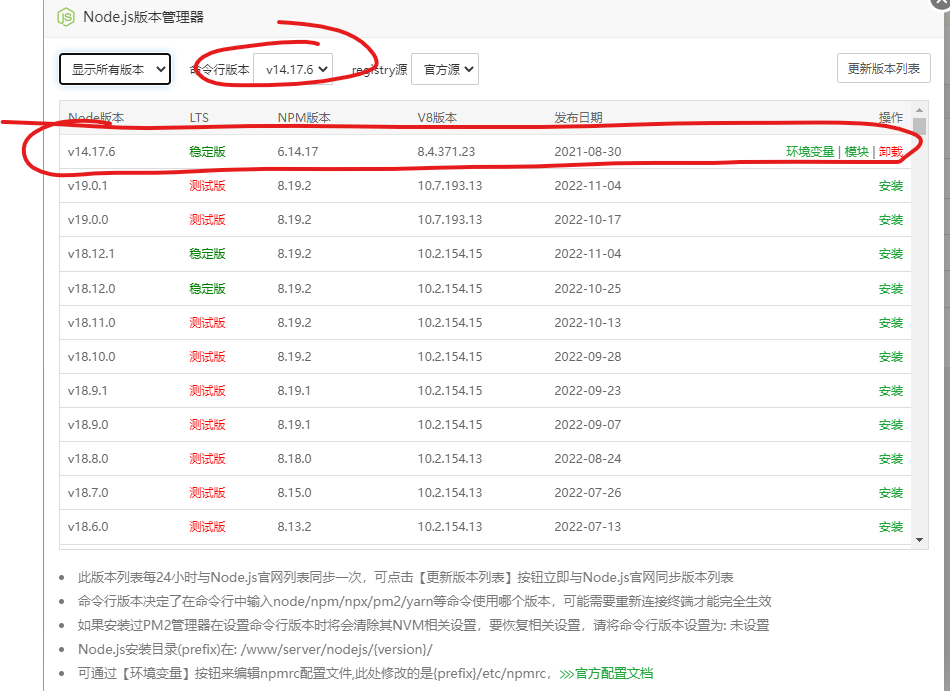
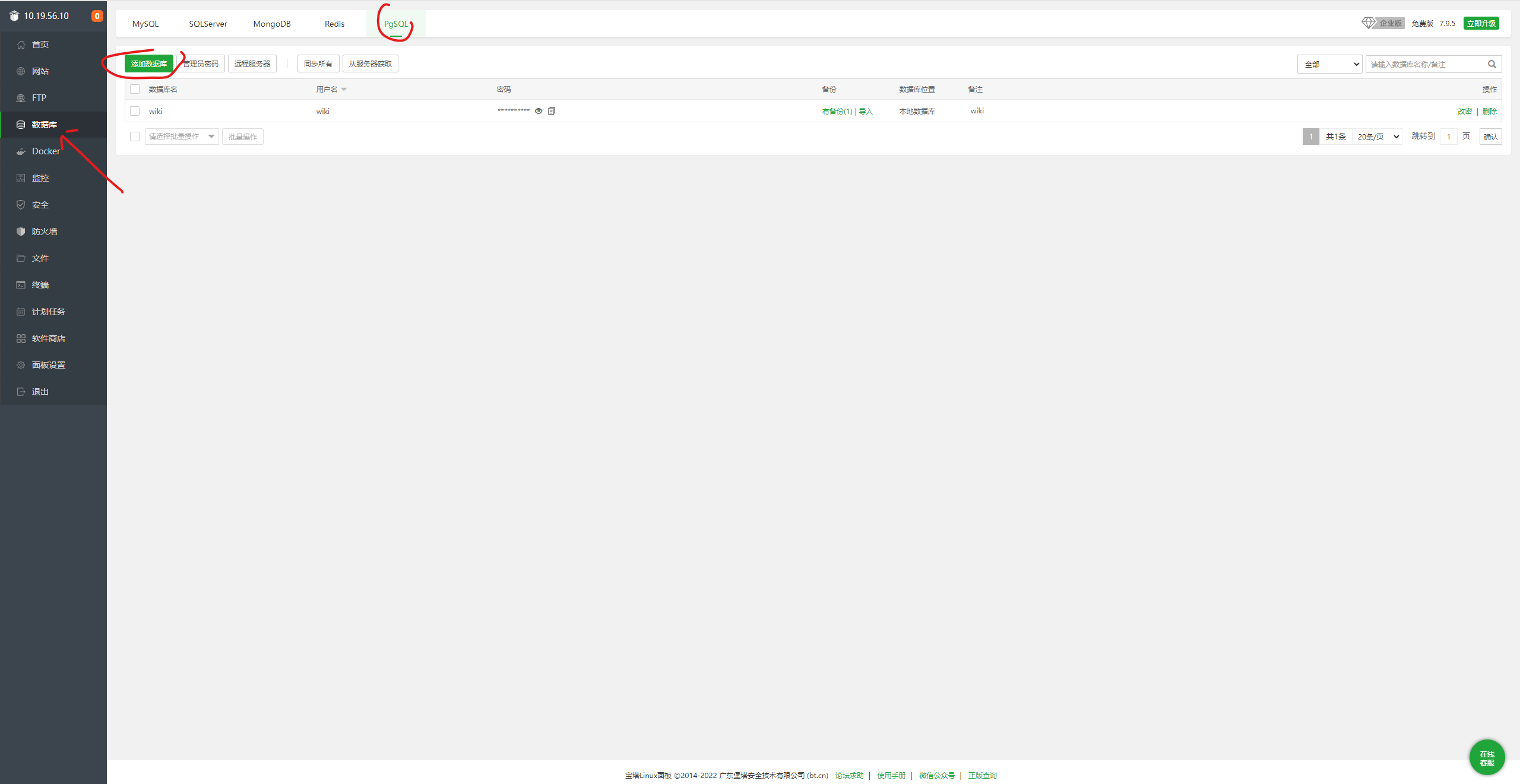
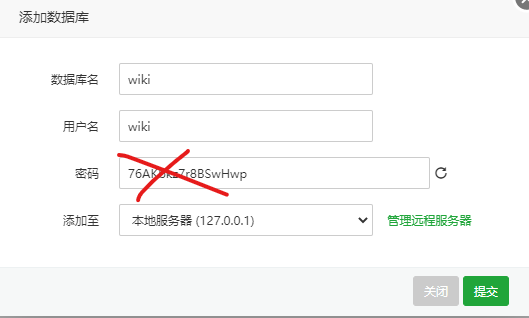
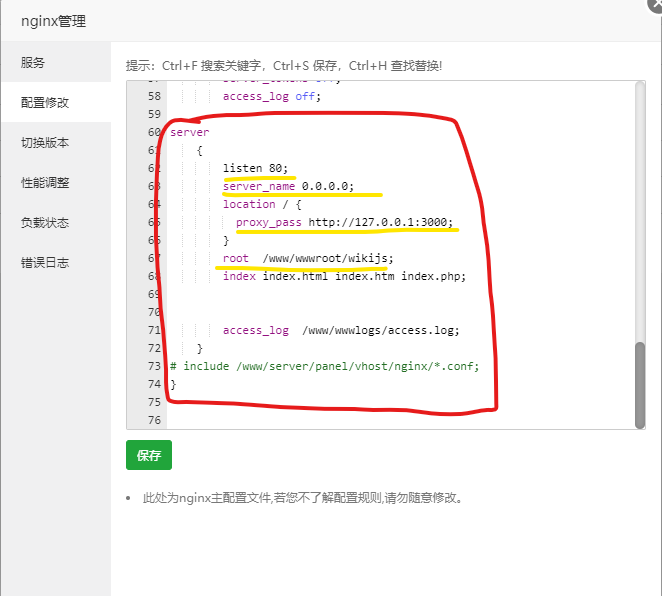
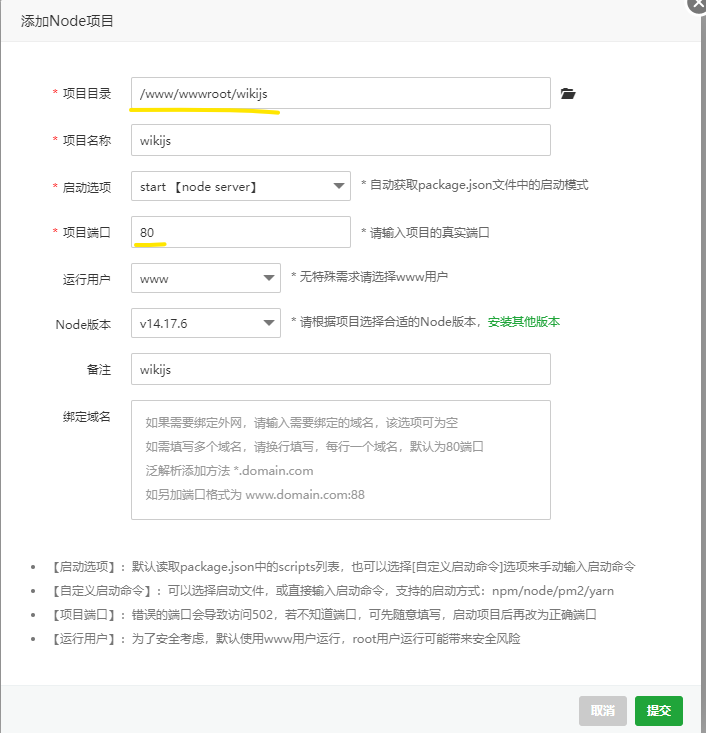
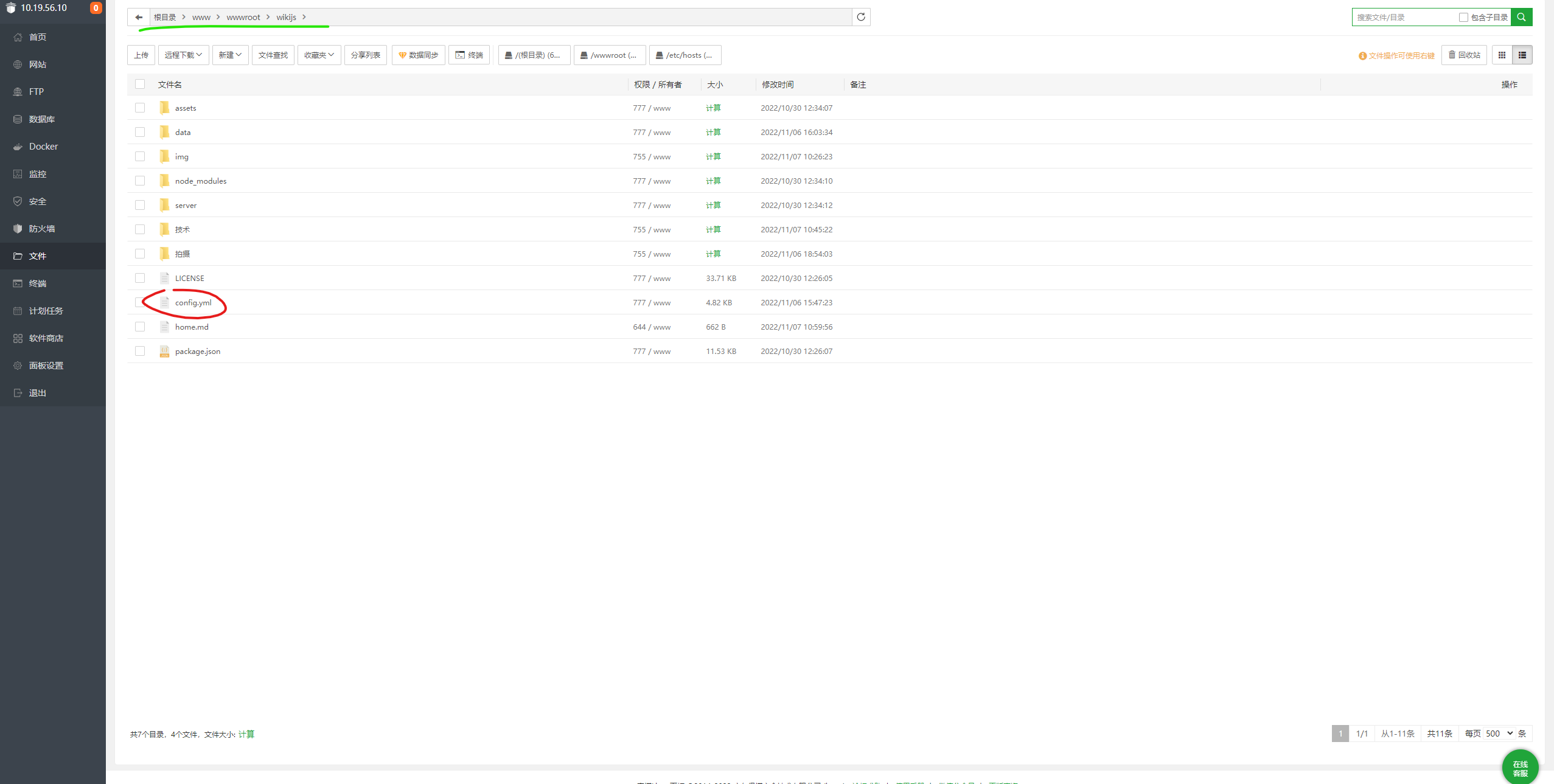
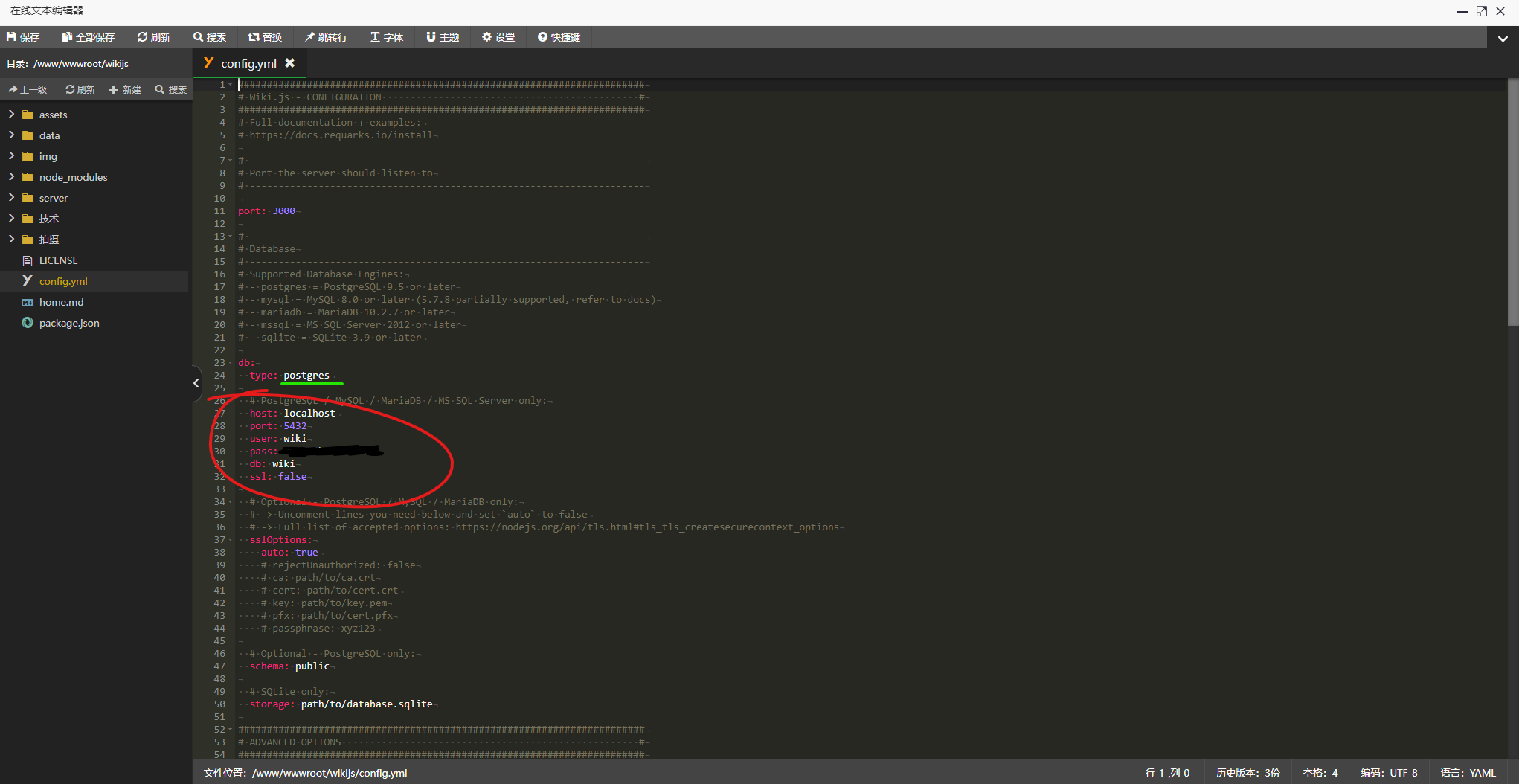
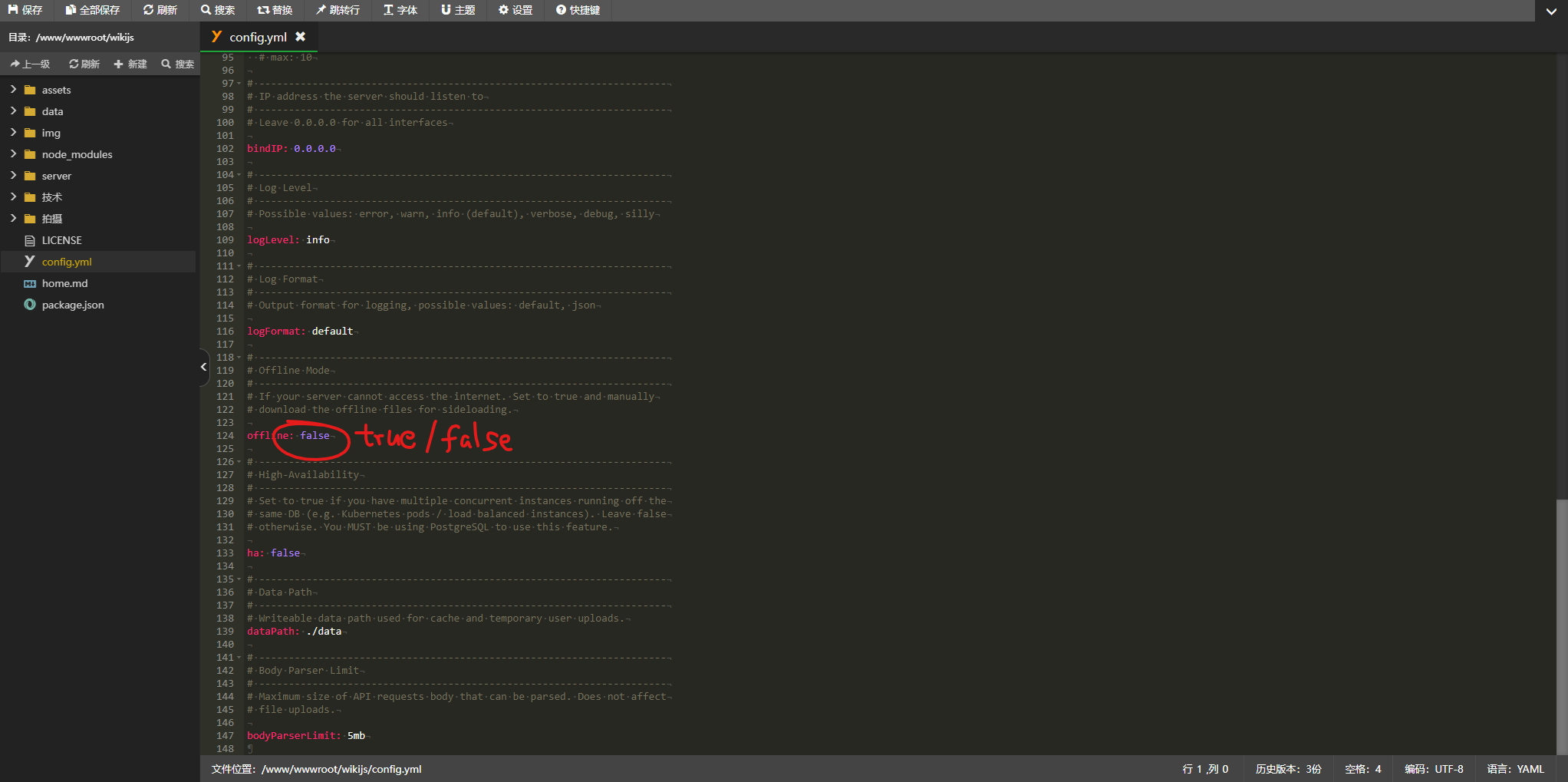
    <content type="html"><![CDATA[<iframe style="border-radius:12px" src="https://open.spotify.com/embed/track/1fnEaGJPQoedHBuCjU3hlm?utm_source=generator" width="100%" height="152" frameBorder="0" allowfullscreen allow="autoplay; clipboard-write; encrypted-media; fullscreen; picture-in-picture" loading="lazy"></iframe><p>默认你已经安装好了docker</p><h2 id="安装">安装</h2><p>安装centos <figure class="highlight apache"><table><tr><td class="gutter"><pre><span class="line">1</span><br></pre></td><td class="code"><pre><code class="hljs apache"><span class="hljs-attribute">docker</span> run -i -t -d -p <span class="hljs-number">8888</span>:<span class="hljs-number">8888</span> -p <span class="hljs-number">888</span>:<span class="hljs-number">888</span> -p <span class="hljs-number">80</span>:<span class="hljs-number">80</span> -p <span class="hljs-number">3306</span>:<span class="hljs-number">3306</span> --privileged=true -v<span class="hljs-meta"> [随便设置一个文件夹]:/wwwroot --name=baota centos:7 /usr/sbin/init</span><br></code></pre></td></tr></table></figure></p><p>进入docker内的centos <figure class="highlight awk"><table><tr><td class="gutter"><pre><span class="line">1</span><br></pre></td><td class="code"><pre><code class="hljs awk">docker exec -i -t baota <span class="hljs-regexp">/bin/</span>bash<br></code></pre></td></tr></table></figure></p><p>安装宝塔 <figure class="highlight vim"><table><tr><td class="gutter"><pre><span class="line">1</span><br></pre></td><td class="code"><pre><code class="hljs vim">yum install -<span class="hljs-keyword">y</span> wget &amp;&amp; wget -O install.<span class="hljs-keyword">sh</span> http://download.bt.<span class="hljs-keyword">cn</span>/install/install_6.<span class="hljs-number">0</span>.<span class="hljs-keyword">sh</span> &amp;&amp; <span class="hljs-keyword">sh</span> install.<span class="hljs-keyword">sh</span><br></code></pre></td></tr></table></figure></p><p>进入宝塔后，在宝塔内地软件商店安装Postgresql和Node.js</p><figure><img src="/images/wikijs/安装插件.png" alt="安装插件" /><figcaption aria-hidden="true">安装插件</figcaption></figure><p><img src="/images/wikijs/安装插件_postgresql.png" alt="Node.js安装版本" /> <img src="/images/wikijs/安装插件_nodejs.png" alt="Node.js安装版本" /></p><p>下载<a href="https://github.com/requarks/wiki/releases/">wiki.js</a>后在<code>/www/wwwroot</code>下解压</p><!-- ![解压后看起来长这样](/images/wikijs/) --><p><img src="/images/wikijs/配置数据库.png" alt="配置数据库" /> <img src="/images/wikijs/配置数据库_2.png" alt="配置数据库" /></p><p><img src="/images/wikijs/配置插件_nginx.png" alt="配置插件_nginx" /> <img src="/images/wikijs/配置网站_node.png" alt="配置网站_node" /> <img src="/images/wikijs/配置网站文件.png" alt="配置网站文件" /> <img src="/images/wikijs/配置网站配置文件.png" alt="配置网站配置文件" /> <img src="/images/wikijs/配置网站离线.png" alt="配置网站离线" /></p>]]></content>


    <summary type="html">&lt;iframe style=&quot;border-radius:12px&quot; src=&quot;https://open.spotify.com/embed/track/1fnEaGJPQoedHBuCjU3hlm?utm_source=generator&quot; width=&quot;100%&quot; heigh</summary>


    <category term="💾服务器" scheme="http://blog.javazero.top/categories/%F0%9F%92%BE%E6%9C%8D%E5%8A%A1%E5%99%A8/"/>
    
    
    <category term="折腾" scheme="http://blog.javazero.top/tags/%E6%8A%98%E8%85%BE/"/>
    
  </entry>
  
  <entry>
    <title>使用socket代理解决企业微信可信ip问题</title>
    <link href="http://blog.javazero.top/2022/09/21/%E4%BD%BF%E7%94%A8%E4%BB%A3%E7%90%86%E8%A7%A3%E5%86%B3%E4%BC%81%E4%B8%9A%E5%BE%AE%E4%BF%A1%E5%8F%AF%E4%BF%A1ip%E9%97%AE%E9%A2%98/"/>
    <id>http://blog.javazero.top/2022/09/21/%E4%BD%BF%E7%94%A8%E4%BB%A3%E7%90%86%E8%A7%A3%E5%86%B3%E4%BC%81%E4%B8%9A%E5%BE%AE%E4%BF%A1%E5%8F%AF%E4%BF%A1ip%E9%97%AE%E9%A2%98/</id>
    <published>2022-09-21T03:16:22.000Z</published>
    <updated>2024-04-22T03:28:40.705Z</updated>
    
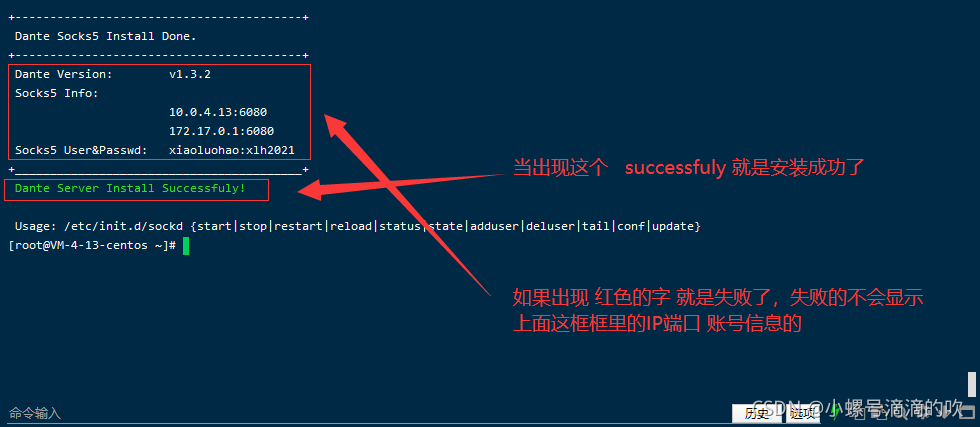
    <content type="html"><![CDATA[<p>最近在网上看到了使用微信测试公众号给女朋友弄的每日推送。不过还是有很多问题的，主要是不能更改头像和名字，非常的不优雅。于是找到了企业微信的api，非常满足我的需要求。</p><p>于是打算自己重新写一个。<a href="https://github.com/JavaZeroo/wechat-bot">直达链接</a> (目前还没有施工完🛠️)</p><h2 id="主要思路">主要思路</h2><p>首先我们需要明确需求：需要一个<strong>固定的公网ip来访问企业微信的api</strong>。</p><p>那第一反应当然就是租用云服务器，然后同时购买固定的公网ip，然后再把云服务器作为代理服务器，帮助我们去访问企业微信api。</p><pre><code class=" mermaid">flowchart LR    A[本地服务器] ---&gt;|Socks代理| B[云服务器] ---&gt; C[企业微信api]    C -.-&gt; B -.-&gt;|Socks代理| A</code></pre><div class="note note-info">            <p><strong>为什么用Socks代理而不用http？</strong></p><ul><li><p>主要是因为http代理无法代理https的流量，比较麻烦。</p></li><li><p>Socks代理性能更好，因为他只负责转发流量，简单理解为Socks代理更纯粹。</p></li></ul>          </div><h2 id="实际操作">实际操作</h2><div class="note note-info">            <p>我的内核：</p><p>CentOS Linux release 7.6.1810 (Core)</p>          </div><h3 id="安装socks5服务端">安装socks5服务端</h3><p>项目地址：<a href="https://github.com/Lozy/danted">https://github.com/Lozy/danted</a></p><p>项目给出了两种安装方式，我这里使用的是脚本安装，直接安装在服务器上。(主要是腾讯云上貌似没有自带docker，懒得折腾了)</p><p>首先下载脚本 <figure class="highlight bash"><table><tr><td class="gutter"><pre><span class="line">1</span><br></pre></td><td class="code"><pre><code class="hljs bash">wget --no-check-certificate https://raw.github.com/Lozy/danted/master/install.sh -O install.sh <br></code></pre></td></tr></table></figure></p><p>安装脚本 <figure class="highlight bash"><table><tr><td class="gutter"><pre><span class="line">1</span><br></pre></td><td class="code"><pre><code class="hljs bash"><span class="hljs-built_in">chmod</span> +x install.sh &amp;&amp; ./install.sh<br></code></pre></td></tr></table></figure> <div class="note note-info">            <p><strong>默认配置的端口是2016，且没有账号密码！！！！</strong></p><p>如果需要自定义参数可以加上：</p><figure class="highlight bash"><table><tr><td class="gutter"><pre><span class="line">1</span><br><span class="line">2</span><br><span class="line">3</span><br></pre></td><td class="code"><pre><code class="hljs bash">--port=端口 \<br>--user=账号 \<br>--passwd=密码<br></code></pre></td></tr></table></figure>          </div></p><figure><img src="/images/socks/安装完成.png" alt="安装完成界面" /><figcaption aria-hidden="true">安装完成界面</figcaption></figure><h3 id="后续配置">后续配置</h3><div class="note note-warning">                      </div><h2 id="参考">参考</h2><p>Socks：https://cloud.tencent.com/developer/article/1682604?from=15425</p><p>安装：https://blog.csdn.net/weixin_44471270/article/details/121343578</p>]]></content>


    <summary type="html">&lt;p&gt;最近在网上看到了使用微信测试公众号给女朋友弄的每日推送。不过还是有很多问题的，主要是不能更改头像和名字，非常的不优雅。于是找到了企业微信的api，非常满足我的需要求。&lt;/p&gt;
&lt;p&gt;于是打算自己重新写一个。&lt;a href=&quot;https://github.com/JavaZe</summary>


    <category term="💾服务器" scheme="http://blog.javazero.top/categories/%F0%9F%92%BE%E6%9C%8D%E5%8A%A1%E5%99%A8/"/>
    
    
    <category term="分享" scheme="http://blog.javazero.top/tags/%E5%88%86%E4%BA%AB/"/>
    
    <category term="折腾" scheme="http://blog.javazero.top/tags/%E6%8A%98%E8%85%BE/"/>
    
    <category term="网络" scheme="http://blog.javazero.top/tags/%E7%BD%91%E7%BB%9C/"/>
    
  </entry>
  
  <entry>
    <title>PowerShell美化</title>
    <link href="http://blog.javazero.top/2022/09/03/PowerShell%E7%BE%8E%E5%8C%96/"/>
    <id>http://blog.javazero.top/2022/09/03/PowerShell%E7%BE%8E%E5%8C%96/</id>
    <published>2022-09-03T06:40:53.000Z</published>
    <updated>2024-04-22T03:28:40.705Z</updated>
    
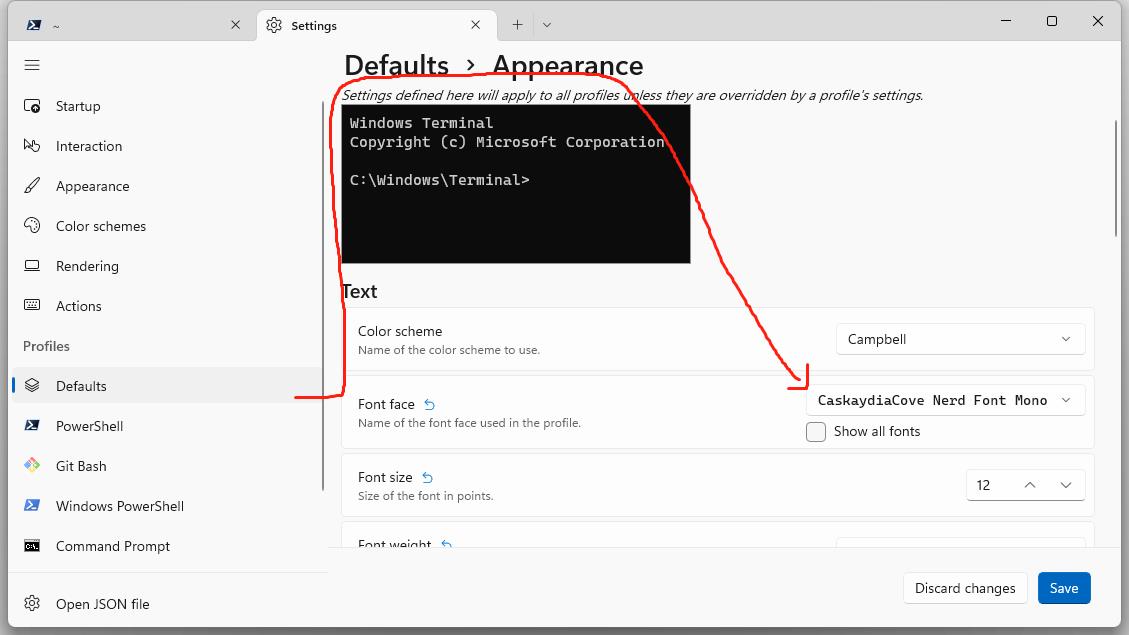
    <content type="html"><![CDATA[<p>最近刚刚重装了系统，记录一下美化的过程 ## PowerShell 7 安装</p><p>在这里面下载最新的PowerShell安装文件，建议使用<code>.msi</code>文件 <figure class="highlight awk"><table><tr><td class="gutter"><pre><span class="line">1</span><br></pre></td><td class="code"><pre><code class="hljs awk">https:<span class="hljs-regexp">//</span>docs.microsoft.com<span class="hljs-regexp">/en-us/</span>powershell<span class="hljs-regexp">/scripting/i</span>nstall/installing-powershell-on-windows?view=powershell-<span class="hljs-number">7.2</span><span class="hljs-comment">#installing-the-msi-package</span><br></code></pre></td></tr></table></figure> 下载完之后，一路下一步就行</p><div class="note note-info">            <p>⚠️这里建议安装的时候，将PowerShell加入到Windows Terminal中。避免后面手动添加</p>          </div><h2 id="ohmyposh安装">ohmyposh安装</h2><p>官方教程: <a href="https://ohmyposh.dev/docs/installation/windows">点这里</a></p><p>这里我就直接用wget了</p><figure class="highlight awk"><table><tr><td class="gutter"><pre><span class="line">1</span><br></pre></td><td class="code"><pre><code class="hljs awk">https:<span class="hljs-regexp">//</span>ohmyposh.dev<span class="hljs-regexp">/docs/i</span>nstallation/windows<br></code></pre></td></tr></table></figure><p>然后要安装Nerd类型的字体(就是一种将一部分字符变成好看的符号的字体🥰)</p><div class="note note-info">            <p>官方是用ohmyposh内置的安装方法。其实我更推荐下载字体文件下来双击安装。这样更熟悉一点。(拒绝离开舒适区🙅🏻)</p>          </div><p>当然，安装完字体后需要在Windows Terminal上设置一下 <a href="/images/PowerShell美化/terminal.jpg">设置位置</a></p><h2 id="马上就好了">马上就好了！</h2><p>现在一切准备就绪，只需要稍微设置一下PowerShell就行了</p><p>输入： <figure class="highlight nginx"><table><tr><td class="gutter"><pre><span class="line">1</span><br></pre></td><td class="code"><pre><code class="hljs nginx"><span class="hljs-attribute">notepad</span> <span class="hljs-variable">$PROFILE</span><br></code></pre></td></tr></table></figure></p><p>把下面这行复制进去，<strong>保存!</strong> 最后复制这个！就行了！ <code>. $PROFILE</code></p><blockquote><p>这里说个题外话😁，其实就是设置Shell的配置 用过linux可能比较熟悉 <figure class="highlight bash"><table><tr><td class="gutter"><pre><span class="line">1</span><br><span class="line">2</span><br></pre></td><td class="code"><pre><code class="hljs bash">vim ~/.bashrc<br><span class="hljs-built_in">source</span> ~/.bashrc<br></code></pre></td></tr></table></figure> 其实是一一对应的，原理都差不多</p></blockquote><h2 id="主题当然你可以不弄">主题！(当然你可以不弄)</h2><p>这里你可以用下面这个指令看到所有的预设主题 <figure class="highlight ebnf"><table><tr><td class="gutter"><pre><span class="line">1</span><br></pre></td><td class="code"><pre><code class="hljs ebnf"><span class="hljs-attribute">Get-PoshThemes</span><br></code></pre></td></tr></table></figure></p><p>选一个你喜欢的，比如说<code>jandedobbeleer</code> 那么你就可以输入下面这个指令换成这个主题： <figure class="highlight applescript"><table><tr><td class="gutter"><pre><span class="line">1</span><br></pre></td><td class="code"><pre><code class="hljs applescript">oh-<span class="hljs-keyword">my</span>-posh init pwsh <span class="hljs-comment">--config ~/.jandedobbeleer.omp.json | Invoke-Expression</span><br></code></pre></td></tr></table></figure> <div class="note note-info">            <p>其实可以看出来<code>~/.jandedobbeleer.omp.json</code> 这个就是<code>jandedobbeleer</code>对应的json文件，所有主题都是以json文件储存的。</p>          </div></p><p>其实你可以自己创建一个主题，这里是<a href="https://ohmyposh.dev/docs/configuration/overview">官方教程</a>，事实上他包括很多插件，eg. Spotiy；</p><p>这里给出我自己的json 你只需要复制以下代码，并且创建一个json文件。然后把上面的<code>~/.jandedobbeleer.omp.json</code>换成你的json文件就行; <figure class="highlight livescript"><table><tr><td class="gutter"><pre><span class="line">1</span><br><span class="line">2</span><br><span class="line">3</span><br><span class="line">4</span><br><span class="line">5</span><br><span class="line">6</span><br><span class="line">7</span><br><span class="line">8</span><br><span class="line">9</span><br><span class="line">10</span><br><span class="line">11</span><br><span class="line">12</span><br><span class="line">13</span><br><span class="line">14</span><br><span class="line">15</span><br><span class="line">16</span><br><span class="line">17</span><br><span class="line">18</span><br><span class="line">19</span><br><span class="line">20</span><br><span class="line">21</span><br><span class="line">22</span><br><span class="line">23</span><br><span class="line">24</span><br><span class="line">25</span><br><span class="line">26</span><br><span class="line">27</span><br><span class="line">28</span><br><span class="line">29</span><br><span class="line">30</span><br><span class="line">31</span><br><span class="line">32</span><br><span class="line">33</span><br><span class="line">34</span><br><span class="line">35</span><br><span class="line">36</span><br><span class="line">37</span><br><span class="line">38</span><br><span class="line">39</span><br><span class="line">40</span><br><span class="line">41</span><br><span class="line">42</span><br><span class="line">43</span><br><span class="line">44</span><br><span class="line">45</span><br><span class="line">46</span><br><span class="line">47</span><br><span class="line">48</span><br><span class="line">49</span><br><span class="line">50</span><br><span class="line">51</span><br><span class="line">52</span><br><span class="line">53</span><br><span class="line">54</span><br><span class="line">55</span><br><span class="line">56</span><br><span class="line">57</span><br><span class="line">58</span><br><span class="line">59</span><br><span class="line">60</span><br><span class="line">61</span><br><span class="line">62</span><br><span class="line">63</span><br><span class="line">64</span><br><span class="line">65</span><br><span class="line">66</span><br><span class="line">67</span><br><span class="line">68</span><br><span class="line">69</span><br><span class="line">70</span><br><span class="line">71</span><br><span class="line">72</span><br><span class="line">73</span><br><span class="line">74</span><br><span class="line">75</span><br><span class="line">76</span><br><span class="line">77</span><br><span class="line">78</span><br><span class="line">79</span><br><span class="line">80</span><br><span class="line">81</span><br><span class="line">82</span><br><span class="line">83</span><br><span class="line">84</span><br><span class="line">85</span><br><span class="line">86</span><br><span class="line">87</span><br><span class="line">88</span><br><span class="line">89</span><br><span class="line">90</span><br><span class="line">91</span><br><span class="line">92</span><br><span class="line">93</span><br><span class="line">94</span><br><span class="line">95</span><br><span class="line">96</span><br><span class="line">97</span><br><span class="line">98</span><br><span class="line">99</span><br><span class="line">100</span><br><span class="line">101</span><br><span class="line">102</span><br><span class="line">103</span><br><span class="line">104</span><br><span class="line">105</span><br><span class="line">106</span><br><span class="line">107</span><br><span class="line">108</span><br><span class="line">109</span><br><span class="line">110</span><br><span class="line">111</span><br><span class="line">112</span><br><span class="line">113</span><br></pre></td><td class="code"><pre><code class="hljs livescript">&#123;<br>  <span class="hljs-string">&quot;$schema&quot;</span>: <span class="hljs-string">&quot;https://raw.githubusercontent.com/JanDeDobbeleer/oh-my-posh/main/themes/schema.json&quot;</span>,<br>  <span class="hljs-string">&quot;blocks&quot;</span>: [<br>    &#123;<br>      <span class="hljs-string">&quot;alignment&quot;</span>: <span class="hljs-string">&quot;left&quot;</span>,<br>      <span class="hljs-string">&quot;segments&quot;</span>: [<br>        &#123;<br>          <span class="hljs-string">&quot;background&quot;</span>: <span class="hljs-string">&quot;#003543&quot;</span>,<br>          <span class="hljs-string">&quot;foreground&quot;</span>: <span class="hljs-string">&quot;<span class="hljs-subst">#fff</span>&quot;</span>,<br>          <span class="hljs-string">&quot;powerline_symbol&quot;</span>: <span class="hljs-string">&quot;\ue0b0&quot;</span>,<br>          <span class="hljs-string">&quot;style&quot;</span>: <span class="hljs-string">&quot;powerline&quot;</span>,<br>          <span class="hljs-string">&quot;template&quot;</span>: <span class="hljs-string">&quot; &#123;&#123; if .WSL &#125;&#125;WSL at &#123;&#123; end &#125;&#125;&#123;&#123;.Icon&#125;&#125;&quot;</span>,<br>          <span class="hljs-string">&quot;type&quot;</span>: <span class="hljs-string">&quot;os&quot;</span><br>        &#125;,<br>        &#123;<br>          <span class="hljs-string">&quot;background&quot;</span>: <span class="hljs-string">&quot;#003543&quot;</span>,<br>          <span class="hljs-string">&quot;foreground&quot;</span>: <span class="hljs-string">&quot;<span class="hljs-subst">#d2ff5e</span>&quot;</span>,<br>          <span class="hljs-string">&quot;powerline_symbol&quot;</span>: <span class="hljs-string">&quot;\ue0b0&quot;</span>,<br>          <span class="hljs-string">&quot;style&quot;</span>: <span class="hljs-string">&quot;powerline&quot;</span>,<br>          <span class="hljs-string">&quot;template&quot;</span>: <span class="hljs-string">&quot;&#123;&#123; .HostName &#125;&#125; &quot;</span>,<br>          <span class="hljs-string">&quot;type&quot;</span>: <span class="hljs-string">&quot;session&quot;</span><br>        &#125;,<br>        &#123;<br>          <span class="hljs-string">&quot;background&quot;</span>: <span class="hljs-string">&quot;#0087D8&quot;</span>,<br>          <span class="hljs-string">&quot;foreground&quot;</span>: <span class="hljs-string">&quot;#003544&quot;</span>,<br>          <span class="hljs-string">&quot;powerline_symbol&quot;</span>: <span class="hljs-string">&quot;\ue0b0&quot;</span>,<br>          <span class="hljs-string">&quot;properties&quot;</span>: &#123;<br>            <span class="hljs-string">&quot;folder_separator_icon&quot;</span>: <span class="hljs-string">&quot;/&quot;</span>,<br>            <span class="hljs-string">&quot;style&quot;</span>: <span class="hljs-string">&quot;full&quot;</span><br>          &#125;,<br>          <span class="hljs-string">&quot;style&quot;</span>: <span class="hljs-string">&quot;powerline&quot;</span>,<br>          <span class="hljs-string">&quot;template&quot;</span>: <span class="hljs-string">&quot; \ue5ff &#123;&#123; .Path &#125;&#125; &quot;</span>,<br>          <span class="hljs-string">&quot;type&quot;</span>: <span class="hljs-string">&quot;path&quot;</span><br>        &#125;,<br>        &#123;<br>          <span class="hljs-string">&quot;background&quot;</span>: <span class="hljs-string">&quot;<span class="hljs-subst">#d2ff5e</span>&quot;</span>,<br>          <span class="hljs-string">&quot;background_templates&quot;</span>: [<br>            <span class="hljs-string">&quot;&#123;&#123; if or (.Working.Changed) (.Staging.Changed) &#125;&#125;<span class="hljs-subst">#ff9248</span>&#123;&#123; end &#125;&#125;&quot;</span>,<br>            <span class="hljs-string">&quot;&#123;&#123; if and (gt .Ahead 0) (gt .Behind 0) &#125;&#125;<span class="hljs-subst">#f26d50</span>&#123;&#123; end &#125;&#125;&quot;</span>,<br>            <span class="hljs-string">&quot;&#123;&#123; if gt .Ahead 0 &#125;&#125;#89d1dc&#123;&#123; end &#125;&#125;&quot;</span>,<br>            <span class="hljs-string">&quot;&#123;&#123; if gt .Behind 0 &#125;&#125;<span class="hljs-subst">#f17c37</span>&#123;&#123; end &#125;&#125;&quot;</span><br>          ],<br>          <span class="hljs-string">&quot;foreground&quot;</span>: <span class="hljs-string">&quot;#193549&quot;</span>,<br>          <span class="hljs-string">&quot;powerline_symbol&quot;</span>: <span class="hljs-string">&quot;\ue0b0&quot;</span>,<br>          <span class="hljs-string">&quot;properties&quot;</span>: &#123;<br>            <span class="hljs-string">&quot;fetch_stash_count&quot;</span>: <span class="hljs-literal">true</span>,<br>            <span class="hljs-string">&quot;fetch_status&quot;</span>: <span class="hljs-literal">true</span><br>          &#125;,<br>          <span class="hljs-string">&quot;style&quot;</span>: <span class="hljs-string">&quot;powerline&quot;</span>,<br>          <span class="hljs-string">&quot;template&quot;</span>: <span class="hljs-string">&quot; &#123;&#123; .HEAD &#125;&#125;&#123;&#123; if .Staging.Changed &#125;&#125; \uf046 &#123;&#123; .Staging.String &#125;&#125;&#123;&#123; end &#125;&#125;&#123;&#123; if and (.Working.Changed) (.Staging.Changed) &#125;&#125; |&#123;&#123; end &#125;&#125;&#123;&#123; if .Working.Changed &#125;&#125; \uf044 &#123;&#123; .Working.String &#125;&#125;&#123;&#123; end &#125;&#125;&#123;&#123; if gt .StashCount 0 &#125;&#125; \uf692 &#123;&#123; .StashCount &#125;&#125;&#123;&#123; end &#125;&#125; &quot;</span>,<br>          <span class="hljs-string">&quot;type&quot;</span>: <span class="hljs-string">&quot;git&quot;</span><br>        &#125;<br>      ],<br>      <span class="hljs-string">&quot;type&quot;</span>: <span class="hljs-string">&quot;prompt&quot;</span><br>    &#125;,<br>    &#123;<br>      <span class="hljs-string">&quot;alignment&quot;</span>: <span class="hljs-string">&quot;right&quot;</span>,<br>      <span class="hljs-string">&quot;segments&quot;</span>: [<br>        &#123;<br>          <span class="hljs-string">&quot;background&quot;</span>: <span class="hljs-string">&quot;#0087D8&quot;</span>,<br>          <span class="hljs-string">&quot;foreground&quot;</span>: <span class="hljs-string">&quot;#003544&quot;</span>,<br>          <span class="hljs-string">&quot;invert_powerline&quot;</span>: <span class="hljs-literal">true</span>,<br>          <span class="hljs-string">&quot;powerline_symbol&quot;</span>: <span class="hljs-string">&quot;\ue0b2&quot;</span>,<br>          <span class="hljs-string">&quot;properties&quot;</span>: &#123;<br>            <span class="hljs-string">&quot;display_mode&quot;</span>: <span class="hljs-string">&quot;context&quot;</span>,<br>            <span class="hljs-string">&quot;fetch_virtual_env&quot;</span>: <span class="hljs-literal">true</span><br>          &#125;,<br>          <span class="hljs-string">&quot;style&quot;</span>: <span class="hljs-string">&quot;powerline&quot;</span>,<br>          <span class="hljs-string">&quot;template&quot;</span>: <span class="hljs-string">&quot; \ue235 &#123;&#123; .Venv &#125;&#125; &quot;</span>,<br>          <span class="hljs-string">&quot;type&quot;</span>: <span class="hljs-string">&quot;python&quot;</span><br>        &#125;,<br>        &#123;<br>          <span class="hljs-string">&quot;background&quot;</span>: <span class="hljs-string">&quot;#003543&quot;</span>,<br>          <span class="hljs-string">&quot;foreground&quot;</span>: <span class="hljs-string">&quot;<span class="hljs-subst">#fff</span>&quot;</span>,<br>          <span class="hljs-string">&quot;invert_powerline&quot;</span>: <span class="hljs-literal">true</span>,<br>          <span class="hljs-string">&quot;powerline_symbol&quot;</span>: <span class="hljs-string">&quot;\ue0b2&quot;</span>,<br>          <span class="hljs-string">&quot;style&quot;</span>: <span class="hljs-string">&quot;powerline&quot;</span>,<br>          <span class="hljs-string">&quot;template&quot;</span>: <span class="hljs-string">&quot;&lt;<span class="hljs-subst">#fff</span>&gt; \uf64f &lt;/&gt;&#123;&#123; .CurrentDate | date .Format &#125;&#125; &quot;</span>,<br>          <span class="hljs-string">&quot;type&quot;</span>: <span class="hljs-string">&quot;time&quot;</span><br>        &#125;<br>      ],<br>      <span class="hljs-string">&quot;type&quot;</span>: <span class="hljs-string">&quot;prompt&quot;</span><br>    &#125;,<br>    &#123;<br>      <span class="hljs-string">&quot;alignment&quot;</span>: <span class="hljs-string">&quot;left&quot;</span>,<br>      <span class="hljs-string">&quot;newline&quot;</span>: <span class="hljs-literal">true</span>,<br>      <span class="hljs-string">&quot;segments&quot;</span>: [<br>        &#123;<br>          <span class="hljs-string">&quot;foreground&quot;</span>: <span class="hljs-string">&quot;<span class="hljs-subst">#FFD700</span>&quot;</span>,<br>          <span class="hljs-string">&quot;style&quot;</span>: <span class="hljs-string">&quot;plain&quot;</span>,<br>          <span class="hljs-string">&quot;template&quot;</span>: <span class="hljs-string">&quot; \u26a1 &quot;</span>,<br>          <span class="hljs-string">&quot;type&quot;</span>: <span class="hljs-string">&quot;root&quot;</span><br>        &#125;,<br>        &#123;<br>          <span class="hljs-string">&quot;foreground&quot;</span>: <span class="hljs-string">&quot;<span class="hljs-subst">#f1184c</span>&quot;</span>,<br>          <span class="hljs-string">&quot;style&quot;</span>: <span class="hljs-string">&quot;plain&quot;</span>,<br>          <span class="hljs-string">&quot;template&quot;</span>: <span class="hljs-string">&quot;💫&quot;</span>,<br>          <span class="hljs-string">&quot;type&quot;</span>: <span class="hljs-string">&quot;text&quot;</span><br>        &#125;<br>      ],<br>      <span class="hljs-string">&quot;type&quot;</span>: <span class="hljs-string">&quot;prompt&quot;</span><br>    &#125;<br>  ],<br>  <span class="hljs-string">&quot;console_title_template&quot;</span>: <span class="hljs-string">&quot;PowerShell&quot;</span>,<br>  <span class="hljs-string">&quot;final_space&quot;</span>: <span class="hljs-literal">true</span>,<br>  <span class="hljs-string">&quot;transient_prompt&quot;</span>: &#123;<br>    <span class="hljs-string">&quot;background&quot;</span>: <span class="hljs-string">&quot;transparent&quot;</span>,<br>    <span class="hljs-string">&quot;foreground&quot;</span>: <span class="hljs-string">&quot;<span class="hljs-subst">#FFD700</span>&quot;</span>,<br>    <span class="hljs-string">&quot;template&quot;</span>: <span class="hljs-string">&quot;&#123;&#123;if .Root&#125;&#125;\u26a1 &#123;&#123;end&#125;&#125;💫 &quot;</span><br>  &#125;,<br>  <span class="hljs-string">&quot;version&quot;</span>: <span class="hljs-number">2</span><br>&#125;<br><br></code></pre></td></tr></table></figure></p>]]></content>


    <summary type="html">&lt;p&gt;最近刚刚重装了系统，记录一下美化的过程 ## PowerShell 7 安装&lt;/p&gt;
&lt;p&gt;在这里面下载最新的PowerShell安装文件，建议使用&lt;code&gt;.msi&lt;/code&gt;文件 &lt;figure class=&quot;highlight awk&quot;&gt;&lt;table&gt;&lt;tr&gt;&lt;t</summary>


    <category term="💻Windows" scheme="http://blog.javazero.top/categories/%F0%9F%92%BBWindows/"/>
    
    
    <category term="软件" scheme="http://blog.javazero.top/tags/%E8%BD%AF%E4%BB%B6/"/>
    
    <category term="分享" scheme="http://blog.javazero.top/tags/%E5%88%86%E4%BA%AB/"/>
    
  </entry>
  
  <entry>
    <title>Kaggle比赛RSNA-2022骨折检测</title>
    <link href="http://blog.javazero.top/2022/09/01/Kaggle_RSNA/"/>
    <id>http://blog.javazero.top/2022/09/01/Kaggle_RSNA/</id>
    <published>2022-09-01T13:18:33.000Z</published>
    <updated>2024-04-22T03:28:40.705Z</updated>
    
    <content type="html"><![CDATA[<p>记录一下第一次认真参加Kaggle比赛 比赛链接：<a href="https://www.kaggle.com/competitions/rsna-2022-cervical-spine-fracture-detection">https://www.kaggle.com/competitions/rsna-2022-cervical-spine-fracture-detection</a></p><p>等待更新☺️</p>]]></content>


    <summary type="html">&lt;p&gt;记录一下第一次认真参加Kaggle比赛 比赛链接：&lt;a href=&quot;https://www.kaggle.com/competitions/rsna-2022-cervical-spine-fracture-detection&quot;&gt;https://www.kaggle.com</summary>


    <category term="📝学习" scheme="http://blog.javazero.top/categories/%F0%9F%93%9D%E5%AD%A6%E4%B9%A0/"/>
    
    
    <category term="cv" scheme="http://blog.javazero.top/tags/cv/"/>
    
    <category term="深度学习" scheme="http://blog.javazero.top/tags/%E6%B7%B1%E5%BA%A6%E5%AD%A6%E4%B9%A0/"/>
    
    <category term="Kaggle" scheme="http://blog.javazero.top/tags/Kaggle/"/>
    
  </entry>
  
  <entry>
    <title>CloudComPy库安装</title>
    <link href="http://blog.javazero.top/2022/08/30/CloudComPy_install/"/>
    <id>http://blog.javazero.top/2022/08/30/CloudComPy_install/</id>
    <published>2022-08-30T03:16:22.000Z</published>
    <updated>2024-04-22T03:28:40.705Z</updated>
    
    <content type="html"><![CDATA[<p>下载链接：<a href="https://www.simulation.openfields.fr/index.php/download-binaries">https://www.simulation.openfields.fr/index.php/download-binaries</a></p><p>官方教程：<a href="https://github.com/CloudCompare/CloudComPy/blob/master/doc/UseLinuxCondaBinary.md">https://github.com/CloudCompare/CloudComPy/blob/master/doc/UseLinuxCondaBinary.md</a></p><h2 id="installing-testing-and-using-a-cloudcompy-binary-on-linux-with-conda">Installing, testing and using a CloudComPy binary on Linux, with conda</h2><div class="note note-danger">            <p>🚫 建议切换SHELL为bash 🚫 我在zsh上安装失败，切换bash成功</p>          </div><p>先下载 <em>CloudComPy_Conda39_Linux64_-date-.tgz</em> <a href="https://www.simulation.openfields.fr/index.php/download-binaries">here</a></p><p>GLIBC版本需要<code>2.29</code>以上。</p><p>检查GLIBC版本: <figure class="highlight ada"><table><tr><td class="gutter"><pre><span class="line">1</span><br></pre></td><td class="code"><pre><code class="hljs ada">ldd <span class="hljs-comment">--version</span><br></code></pre></td></tr></table></figure></p><p>必须先更新conda <figure class="highlight excel"><table><tr><td class="gutter"><pre><span class="line">1</span><br></pre></td><td class="code"><pre><code class="hljs excel">conda update -y -<span class="hljs-built_in">n</span> <span class="hljs-built_in">base</span> -c defaults conda<br></code></pre></td></tr></table></figure></p><p>新建一个conda环境 <figure class="highlight apache"><table><tr><td class="gutter"><pre><span class="line">1</span><br></pre></td><td class="code"><pre><code class="hljs apache"><span class="hljs-attribute">conda</span> create --name CloudComPy39 python=<span class="hljs-number">3</span>.<span class="hljs-number">9</span><br></code></pre></td></tr></table></figure></p><p>安装需要的包 <figure class="highlight mipsasm"><table><tr><td class="gutter"><pre><span class="line">1</span><br><span class="line">2</span><br><span class="line">3</span><br><span class="line">4</span><br></pre></td><td class="code"><pre><code class="hljs mipsasm">conda activate <span class="hljs-keyword">CloudComPy39</span><br><span class="hljs-keyword"></span>conda <span class="hljs-built_in">config</span> --<span class="hljs-keyword">add </span>channels conda-forge<br>conda <span class="hljs-built_in">config</span> --set channel_priority strict<br>conda <span class="hljs-keyword">install </span><span class="hljs-string">&quot;boost=1.72&quot;</span> <span class="hljs-string">&quot;cgal=5.0&quot;</span> cmake ffmpeg <span class="hljs-string">&quot;gdal=3.3&quot;</span> <span class="hljs-keyword">jupyterlab </span><span class="hljs-string">&quot;matplotlib=3.5&quot;</span> <span class="hljs-string">&quot;mysql=8.0&quot;</span> <span class="hljs-string">&quot;numpy=1.22&quot;</span> <span class="hljs-string">&quot;opencv=4.5.3&quot;</span> <span class="hljs-string">&quot;openmp=8.0&quot;</span> <span class="hljs-string">&quot;pcl=1.11&quot;</span> <span class="hljs-string">&quot;pdal=2.3&quot;</span> <span class="hljs-string">&quot;psutil=5.9&quot;</span> <span class="hljs-string">&quot;qhull=2019.1&quot;</span> <span class="hljs-string">&quot;qt=5.12&quot;</span> <span class="hljs-string">&quot;scipy=1.8&quot;</span> sphinx_rtd_theme spyder tbb tbb-devel <span class="hljs-string">&quot;xerces-c=3.2&quot;</span><br></code></pre></td></tr></table></figure></p><div class="note note-info">            <p>如果遇到<code>Solving environment: failed with initial frozen solve. Retrying with flexible solve.</code> 可以尝试重新新建一个conda环境</p>          </div><h3 id="如何使用">如何使用:</h3><p>不能用<code>conda activate &lt;env&gt;</code>需要使用 <code>CloudComPy39/bin/condaCloud.sh</code> 替代</p><p>将<code>&lt;path install&gt;</code>替换成你的CloudComPy39的目录 <figure class="highlight arcade"><table><tr><td class="gutter"><pre><span class="line">1</span><br></pre></td><td class="code"><pre><code class="hljs arcade">. &lt;path install&gt;<span class="hljs-regexp">/bin/</span>condaCloud.sh activate CloudComPy39<br></code></pre></td></tr></table></figure></p><p><strong>Remark</strong>: 可能需要安装 libomp.so.5: <figure class="highlight routeros"><table><tr><td class="gutter"><pre><span class="line">1</span><br><span class="line">2</span><br></pre></td><td class="code"><pre><code class="hljs routeros">sudo apt-<span class="hljs-built_in">get</span> install libomp5<br><br></code></pre></td></tr></table></figure></p><p>测试所有项目（大约需要2分钟）: <figure class="highlight arcade"><table><tr><td class="gutter"><pre><span class="line">1</span><br><span class="line">2</span><br><span class="line">3</span><br></pre></td><td class="code"><pre><code class="hljs arcade">. &lt;path install&gt;<span class="hljs-regexp">/bin/</span>condaCloud.sh activate CloudComPy39<br>cd  &lt;path install&gt;<span class="hljs-regexp">/doc/</span>PythonAPI_test<br>ctest<br></code></pre></td></tr></table></figure></p><p>测试会输出到这里: <code>$&#123;HOME&#125;/CloudComPy/Data</code></p><h3 id="在vscode上编辑">在vscode上编辑</h3><p>如果直接打开在vscode的话就无法<code>import cloudComPy</code></p><p><strong>正确的做法是</strong> <figure class="highlight vim"><table><tr><td class="gutter"><pre><span class="line">1</span><br><span class="line">2</span><br></pre></td><td class="code"><pre><code class="hljs vim">. &lt;path install&gt;/bin/condaCloud.<span class="hljs-keyword">sh</span> activate CloudComPy39<br>code -g &lt;folder <span class="hljs-keyword">to</span> <span class="hljs-keyword">edit</span>&gt;<br></code></pre></td></tr></table></figure></p><h3 id="官方文档">官方文档</h3><p><a href="https://www.simulation.openfields.fr/documentation/CloudComPy/html/index.html">https://www.simulation.openfields.fr/documentation/CloudComPy/html/index.html</a></p><h1 id="一些小细节">一些小细节</h1><h2 id="读取cloudcompy的点云数据">读取CloudComPy的点云数据</h2><p>和open3d不太一样，读取点云数据有两种选择</p><ol type="1"><li><p>需要去修改点云的位置时用<code>toNpArray()</code></p></li><li><p>复制出点云的点时用<code>toNpArrayCopy()</code></p></li></ol><h2 id="给cloudcompy点云上色">给CloudComPy点云上色</h2><p>当前版本(2.12)好像存在一些问题，建议转成open3d的数据类型后再添加颜色🤨</p>]]></content>


    <summary type="html">&lt;p&gt;下载链接：&lt;a href=&quot;https://www.simulation.openfields.fr/index.php/download-binaries&quot;&gt;https://www.simulation.openfields.fr/index.php/download-b</summary>


    <category term="🖥️Python" scheme="http://blog.javazero.top/categories/%F0%9F%96%A5%EF%B8%8FPython/"/>
    
    
    <category term="cv" scheme="http://blog.javazero.top/tags/cv/"/>
    
    <category term="点云配准" scheme="http://blog.javazero.top/tags/%E7%82%B9%E4%BA%91%E9%85%8D%E5%87%86/"/>
    
  </entry>
  
  <entry>
    <title>Pandas的数据操作</title>
    <link href="http://blog.javazero.top/2022/08/30/pandas%E7%94%A8%E6%B3%95/"/>
    <id>http://blog.javazero.top/2022/08/30/pandas%E7%94%A8%E6%B3%95/</id>
    <published>2022-08-30T01:09:16.000Z</published>
    <updated>2024-04-22T03:28:40.705Z</updated>
    
    <content type="html"><![CDATA[<p>最近在打Kaggle，遇到很夸张的数据预处理。 平时每次要用pandas都是现翻文档，感觉太慢，以后用到什么pandas的函数就在这里记录一下😘</p><h2 id="提取数据">提取数据</h2><h3 id="locilocix">loc、iloc、ix</h3><p>都是对DataFrame类的方法。</p><p>loc：通过选取行（列）标签索引数据 iloc：通过选取行（列）位置编号索引数据 ix：既可以通过行（列）标签索引数据，也可以通过行（列）位置编号索引数据</p>]]></content>


    <summary type="html">&lt;p&gt;最近在打Kaggle，遇到很夸张的数据预处理。 平时每次要用pandas都是现翻文档，感觉太慢，以后用到什么pandas的函数就在这里记录一下😘&lt;/p&gt;
&lt;h2 id=&quot;提取数据&quot;&gt;提取数据&lt;/h2&gt;
&lt;h3 id=&quot;locilocix&quot;&gt;loc、iloc、ix&lt;/h3&gt;</summary>


    <category term="🖥️Python" scheme="http://blog.javazero.top/categories/%F0%9F%96%A5%EF%B8%8FPython/"/>
    
    
    <category term="Pandas" scheme="http://blog.javazero.top/tags/Pandas/"/>
    
    <category term="数据处理" scheme="http://blog.javazero.top/tags/%E6%95%B0%E6%8D%AE%E5%A4%84%E7%90%86/"/>
    
  </entry>
  
  <entry>
    <title>齐次坐标系的理解</title>
    <link href="http://blog.javazero.top/2022/08/26/%E9%BD%90%E6%AC%A1%E5%9D%90%E6%A0%87%E7%B3%BB%E7%9A%84%E7%90%86%E8%A7%A3/"/>
    <id>http://blog.javazero.top/2022/08/26/%E9%BD%90%E6%AC%A1%E5%9D%90%E6%A0%87%E7%B3%BB%E7%9A%84%E7%90%86%E8%A7%A3/</id>
    <published>2022-08-26T06:19:25.000Z</published>
    <updated>2024-04-22T03:28:40.705Z</updated>
    
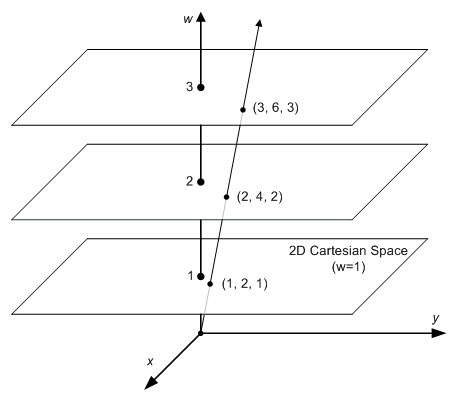
    <content type="html"><![CDATA[<p>在计算机图形学里面会经常碰到几何体的平移,旋转,缩放以及投影变换. 一般情况下会涉及到齐次坐标与变换矩阵. 为了后续对变换矩阵内容的讲解, 在这里先简要的介绍一下什么是齐次坐标.</p><h2 id="提出问题">提出问题</h2><p><strong>两条平行线可以相交吗？</strong></p><p>在欧氏空间（几何学）中，同一平面上的两条平行线不能相交，或者说不能永远相交。这是一个大家都熟悉的常识。</p><p>但是，在投影空间中就不一样了，比如，下图上的火车铁路在远离眼睛的时候会变得更窄。最后，两条平行的铁轨在地平线处相交，也就是无限远处的一点。</p><p><img src="/images/train.jpg" alt="train.jpg" /><em>铁路变窄，在地平线处相交</em></p><p>欧氏空间（或笛卡尔空间）能很好地描述我们的2D/3D几何，但它们不足以处理投影空间（实际上，欧氏几何是投影几何的一个子集）。一个2D点的笛卡尔坐标可以表示为<span class="math inline">\((x，y)\)</span>。</p><p>如果这个点远去到无穷远呢？无穷远处的点在欧氏空间中无法具体展示。在投影空间中，平行线会在无穷远处相遇，但在欧氏空间中却做不到。</p><h2 id="解决方法">解决方法</h2><p>由 August Ferdinand Möbius(不错,就是那个莫比乌斯圈的那位) 提出的齐次坐标，使图形和几何学的计算在投影空间中成为可能。齐次坐标是用<span class="math inline">\(N+1\)</span>个数来表示N维坐标的一种方式。</p><p>要制作二维齐次坐标，我们只需在现有坐标中增加一个额外的变量w。因此，笛卡尔坐标中的一点，<span class="math inline">\((X，Y)\)</span>在齐次坐标中就变成了<span class="math inline">\((x，y，w)\)</span>。而笛卡儿坐标中的X和Y在齐次坐标中的<span class="math inline">\(x\)</span>、<span class="math inline">\(y\)</span>和<span class="math inline">\(w\)</span>则重新表达为</p><p><span class="math display">\[\begin{aligned}X = \frac{x}{w} \\ Y = \frac{y}{w}\end{aligned}\]</span></p><p>为什么叫 “齐次”呢？ 如前所述，为了将齐次坐标<span class="math inline">\((x，y，w)\)</span>转换为笛卡尔坐标，我们只需将<span class="math inline">\(x\)</span>和<span class="math inline">\(y\)</span>除以<span class="math inline">\(w\)</span>即可。 <span class="math display">\[(x, y, w) \Leftrightarrow \Big(\frac{x}{w}, \frac{y}{w}\Big)\]</span> 将Homogeneous转换为Cartesian，我们可以发现一个重要的事实。让我们看看下面的例子。 <span class="math display">\[\begin{aligned}Homogeneous&amp; \quad Cartesian&amp; \\(1, 2, 3)\ &amp;\Rightarrow \Big( \frac{1}{3}, \frac{2}{3} \Big)&amp; \\(2, 4, 6)\ &amp;\Rightarrow \Big(\frac{2}{6}, \frac{4}{6} \Big)&amp; &amp;=\Big(\frac{1}{3}, \frac{2}{3}\Big) \\(4, 8, 12)\ &amp;\Rightarrow \Big(\frac{4}{12}, \frac{8}{12} \Big)&amp; &amp;=\Big(\frac{1}{3}, \frac{2}{3}\Big) \\&amp;\;\;\vdots \\(1a, 2a, 3a)\ &amp;\Rightarrow \Big(\frac{1a}{3a}, \frac{2a}{4a} \Big)&amp; &amp;=\Big(\frac{1}{3}, \frac{2}{3}\Big) \\\end{aligned}\]</span> 如你所见 <span class="math inline">\((1, 2, 3), (2, 4, 6)\)</span>和<span class="math inline">\((4, 8, 12)\)</span>这三个点对应于同一个欧氏点<span class="math inline">\((\frac{1}{3}, \frac{2}{3})\)</span>. 而任何乘以<span class="math inline">\(a\)</span>的数<span class="math inline">\(（1a，2a，3a）\)</span>与欧氏空间中的<span class="math inline">\(（\frac{1}{3}，\frac{2}{3}）\)</span>是同一个点。因此，这些点是 “homogeneous/齐次 “的，因为它们在欧氏空间（或笛卡尔空间）中代表同一个点。换句话说，齐次坐标是与乘数<span class="math inline">\(a\)</span>不相关的。</p><figure><img src="/images/Homogeneous2Cartesian.jpg" alt="Homogeneous2Cartesian.jpg" /><figcaption aria-hidden="true">Homogeneous2Cartesian.jpg</figcaption></figure><h2 id="数学证明-两条平行线可以相交">数学证明: 两条平行线可以相交</h2><p>考虑以下欧氏空间的线性系统。 <span class="math display">\[\left \{ \begin{array}{c}Ax+By+C=0 \\ Ax+By+D=0\end{array}\right.\]</span></p><p>而我们知道，由于C≠D，所以上述方程没有解。 如果C=D，那么两条线是相同的（重叠的）。</p><p>让我们重写投影空间的方程，将x和y分别替换为x/w，y/w。 <span class="math display">\[\left\{\begin{array}{l}A \frac{x}{w}+B \frac{y}{w}+C=0 \\ A \frac{x}{w}+B \frac{y}{w}+D=0\end{array} \quad \Rightarrow\left\{\begin{array}{l}A x+B y+C w=0 \\ A x+B y+D w=0\end{array}\right.\right.\]</span> 现在，我们有一个解，<span class="math inline">\((x，y，0)\)</span>，因为<span class="math inline">\((C-D)w=0，\therefore w=0.\)</span> 因此，两条平行线在<span class="math inline">\((x，y，0)\)</span>处相交.</p><p><span class="math inline">\((x,y,0)\)</span>在几何上代表一条没有起点与终点, 也没有长度的射线，它只有方向。</p><h2 id="齐次坐标的应用">齐次坐标的应用</h2><p>齐次坐标在计算机图形学中是非常有用的基本概念，通过增加一个额外的维度<span class="math inline">\(W\)</span>后，可以用来对几何体进行缩放,旋转,平移,透视投影的矩阵变换.</p><p>任何<span class="math inline">\(N\)</span>维度齐次坐标，只要<span class="math inline">\(W\)</span>不为<span class="math inline">\(0\)</span>，都可以通过将每一个分量除以<span class="math inline">\(W\)</span>来转换到 <span class="math inline">\(W=1\)</span>的向量, 然后获得其<span class="math inline">\(N-1\)</span>维的欧式空间的点值。</p><p>而当<span class="math inline">\(W=0\)</span>时，这个坐标表示无限长的一个向量，通常表示<span class="math inline">\(N-1\)</span>维的矢量。</p>]]></content>


    <summary type="html">&lt;p&gt;在计算机图形学里面会经常碰到几何体的平移,旋转,缩放以及投影变换. 一般情况下会涉及到齐次坐标与变换矩阵. 为了后续对变换矩阵内容的讲解, 在这里先简要的介绍一下什么是齐次坐标.&lt;/p&gt;
&lt;h2 id=&quot;提出问题&quot;&gt;提出问题&lt;/h2&gt;
&lt;p&gt;&lt;strong&gt;两条平行线可以相</summary>


    <category term="📝学习" scheme="http://blog.javazero.top/categories/%F0%9F%93%9D%E5%AD%A6%E4%B9%A0/"/>
    
    
    <category term="cv" scheme="http://blog.javazero.top/tags/cv/"/>
    
  </entry>
  
  <entry>
    <title>NgeNet论文理解</title>
    <link href="http://blog.javazero.top/2022/08/25/ngenet/"/>
    <id>http://blog.javazero.top/2022/08/25/ngenet/</id>
    <published>2022-08-25T09:09:16.000Z</published>
    <updated>2024-04-22T03:28:40.705Z</updated>
    
    <content type="html"><![CDATA[<hr /><p>由于点云传统配准（ICP：迭代最近点算法）效果不佳，于是考虑使用深度学习的方法。 这里采用<a href="https://paperswithcode.com/paper/neighborhood-aware-geometric-encoding-network">NgeNet</a>。</p><blockquote><p>Neighborhood-aware Geometric Encoding Network 邻域感知几何编码网络</p><p>论文链接：<a href="https://arxiv.org/abs/2201.12094">https://arxiv.org/abs/2201.12094</a></p></blockquote><h2 id="introduction">Introduction</h2><h3 id="点云配准深度学习方法的分类">点云配准深度学习方法的分类</h3><p>作者将其分为了两种</p><ol type="1"><li>end-to-end：将feature learning 和 transformation estimation 融合到了一个模型<ol type="1"><li>其中有一些方法依赖相关性的建立来进行后续的Procrustes分析</li><li>而其他方法则更关注点云之间的全局特征</li></ol></li><li>feature-learning：更加关注learning of discriminative point feature（学习辨别性的点的特征），而transformation则是由pose estimators来估计的</li></ol><h3 id="提出网络">提出网络</h3><p>NgeNet利用多尺度结构明确地生成具有多种邻域大小的点状特征，并利用几何指导的编码模块来最大限度地利用几何信息。具体来说，设计了一个投票机制，为每个点选择一个合适的邻域大小，并拒绝在无法区分的表面上出现虚假的特征。</p><h3 id="主要贡献">主要贡献</h3><ul><li>多尺度结构与几何引导编码相结合，产生多层次的几何和语义信息编码的特征。</li><li>多层次的一致性投票，为每个点选择适当的邻域并拒绝虚假的邻域。</li><li>我们的方法中所提出的技术是与模型无关的，能够很容易地移植到其他骨干结构上并提高性能。</li></ul><h2 id="preliminaries-引言">Preliminaries （引言）</h2><h3 id="点云配准问题的数学表达">点云配准问题的数学表达</h3><div class="note note-info">            <p>arg 是变元（即自变量argument）的英文缩写。 arg min 就是使后面这个式子达到最小值时的变量的取值 arg max 就是使后面这个式子达到最大值时的变量的取值 例如 函数F(x,y): arg min F(x,y)就是指当F(x,y)取得最小值时，变量x,y的取值 arg max F(x,y)就是指当F(x,y)取得最大值时，变量x,y的取值</p>          </div><p><span class="math display">\[arg\ \underset{T}{\mathrm{min}}\frac{1}{|\sigma|}\sum_{(i, j)\in \sigma}||T (x_i ) − y_j ||_2\]</span></p><blockquote><p><a href="https://zh.wikipedia.org/wiki/%E5%9F%BA%E6%95%B0_(%E6%95%B0%E5%AD%A6)">Cardinal Number(基数)</a>：集合论中刻画集合大小的数</p></blockquote><h3 id="邻域分析">邻域分析</h3><p>在特征学习中常常用到encoder-decoder网络来提取特征； 模型的输入为<span class="math inline">\(X\in\mathbb{R}^3\)</span> 维数从<span class="math inline">\(N\times 3\)</span> -&gt; $N C $意思是每个点输出C维的特征</p><p>有两种方式去影响领域的范围一个是依靠连续的卷积层，隐形的增加了领域的范围；另一个是在encoder-decoder网络中常常使用两倍大小的分层卷积层来模拟点云的down sample。</p><h2 id="方法">方法</h2><h3 id="网络">网络</h3><figure><img src="/images/ngenet/Architecture-of-NgeNet.png" alt="NgeNet的网络架构" /><figcaption aria-hidden="true">NgeNet的网络架构</figcaption></figure><p>可以很清楚的看到NgeNet是一个encoder-decoder网络 - encoder模块由：<strong>residual-style <a href="https://arxiv.org/abs/1904.08889">KPConv</a></strong>/<strong>strided KPConv</strong>层、<strong>instance norm</strong>层和<strong>Leaky ReLU</strong>层（k=0.1）组成</p><blockquote><p>KPConv 是用于三维点云中的一种卷积方式</p></blockquote><ul><li>decoder模块由：decoder中的上采样块采用最近搜索来进行特征插值。 <strong>unary block</strong>由一个线性（MLP）层、一个实例范数层和一个 Leaky ReLU 层 (k=0.1) 组成，而<strong>last unary</strong> block仅由一个线性层（MLP）组成</li></ul><h3 id="input是什么">Input是什么？</h3><p>Input为the source point cloud <span class="math inline">\(X\)</span> and its initial descriptor <span class="math inline">\(F_X\)</span> , the target point cloud <span class="math inline">\(Y\)</span> and its initial descriptor <span class="math inline">\(F_Y\)</span></p><ul><li>其中<span class="math inline">\(F_X\)</span> and <span class="math inline">\(F_Y\)</span> 都被init为全部为<span class="math inline">\(1\)</span>的矩阵</li></ul><h3 id="组成部分">组成部分</h3><h4 id="siamese-multi---scale-backbone">SIAMESE MULTI - SCALE BACKBONE</h4><blockquote><p>连体式多级骨干（什么鬼翻译</p></blockquote><p><strong>用途：</strong>用于处理输入的点云</p><p><strong>如何工作？</strong></p><ul><li><p>Shared Encoder：可以在绿色的Encoder部分看到一共做了四次卷积；这样做是<strong>为了拓展领域特征</strong>。此时一共有四个输出，最后的输出得到<strong>Super points <span class="math inline">\(X&#39;\)</span></strong> （<span class="math inline">\(X&#39;\)</span>集合会在下文经常提到其中包括他的点<span class="math inline">\(x&#39;_i \in X &#39;\)</span>）和它的feature <span class="math inline">\(F^{en}_{X&#39;}\)</span>（我理解上标的en意思是end；最后一个输出）；前三步输出的feature作为中间变量也被保存了下来，为了decoder去生成multi-scale的feature。这三个中间变量被记为<span class="math inline">\(F^1_{X}, F^2_{X}, F^3_{X}\)</span>。这里需要注意的是，<strong>每个点特征的邻接点的感知范围从<span class="math inline">\(F^1_X\)</span>延伸到<span class="math inline">\(F^3_{X}\)</span></strong> （最后一句话是KPConv的知识）</p><ul><li>最后Shared Encoder输出的是<span class="math inline">\(X&#39; \in \mathbb{R}^{N&#39; \times 3}\)</span> 和<span class="math inline">\(F^{en}_{X&#39;} \in \mathbb{R}^{N&#39; \times D_{en} }\)</span> ，加起来是应该是<span class="math inline">\((X&#39;, F^{en}_{X&#39;}) \in \mathbb{R}^{N&#39; \times (3+D_en)}\)</span>（<strong>有待考证</strong>）</li></ul></li><li><p>Parallel Decoder：上面说在decoder的时候需要用到我们刚才保存的<span class="math inline">\(F^1_{X}, F^2_{X}, F^3_{X}\)</span>，同时还有之后会介绍的<span class="math inline">\(F^{inter}_{X&#39;}\)</span>，一共这四个输入。最后得到的output是关于<span class="math inline">\(X&#39;\)</span>的高、中、低级别的feature</p></li><li><p>现在我们定义一个函数（后面要用） <span class="math display">\[\phi (F^1 , F^2 , g) = cat[Up(g(F^2 )), F^1 ]\]</span> 其中<span class="math inline">\(F^1\)</span>和<span class="math inline">\(F^2\)</span>是输入的feature，<span class="math inline">\(g\)</span>是一个代表MLP或者Identity Layer的函数， <span class="math inline">\(cat\)</span>表示concatenation（拼接矩阵），<span class="math inline">\(Up\)</span>是nearest upsampling</p></li><li><p>现在可以表示 <span class="math inline">\(F^l_X , F^m_X\)</span> 和 <span class="math inline">\(F^h_X\)</span> 的计算方式</p></li></ul><p><span class="math display">\[\begin{split}F^l_X &amp;= MLP_2(\phi(F^1_X, F^2_X, MLP_1), \\F^m_X &amp;= MLP_5(\phi(F^1_X, \phi (F^2_X, F^3_X, MLP_3), MLP_4), \\F^h_X &amp;= MLP_8(\phi(F^1_X, \phi (F^2_X, \phi (F^3_X, F^{inter}_X, Identity), MLP_6), MLP_7 ).\end{split}\]</span></p><ul><li>同时给出overlap（重复性）分数<span class="math inline">\(O_X\)</span>和saliency（显著性）分数<span class="math inline">\(S_X\)</span></li></ul><h4 id="geometric---guided-encoding">GEOMETRIC - GUIDED ENCODING</h4><blockquote><p>几何学引导式编码</p></blockquote><p>GGE模块是一个 一个输入一个输出的模块</p><figure><img src="/images/ngenet/Architecture-of-GGE.png" alt="GGE模块" /><figcaption aria-hidden="true">GGE模块</figcaption></figure><p><strong>用途：</strong>GGE将super points和潜在的feature(<strong>也就是Shared Encoder输出的<span class="math inline">\((X&#39;, F^{en}_{X&#39;}) \in \mathbb{R}^{N&#39; \times (3 + D_{en})}\)</span></strong>)作为输入；然后输出几何增强后的feature</p><p><strong>如何工作？</strong></p><ul><li>Normal vectors smoothing：这里计算Normal vector的方式比较特别。这一步的目的是去获得super points的Normal vector，但是他没有直接去用open3d的库直接计算。而是将super points的点映射回原来的全部点集中。再通过全部点集中，super points周围点的normal vectors去平均得到super points的normal vector。</li></ul><p><span class="math display">\[N_{X_i^{&#39;}}=\frac{1}{|J_i^N|}\sum_{x_j \in J_i^N}{N_{X_j}}\]</span></p><p>公式里面<span class="math inline">\(J_i^N = \{x_j| \left|| x_j-x&#39;_i \right|| &lt; r^N \}\)</span> 其中<span class="math inline">\(x_j\in X\)</span>，<span class="math inline">\(r^N\)</span>是<span class="math inline">\(x&#39;_i\)</span>的邻域。 <div class="note note-info">            <p>稍微解释一下公式：</p><p><span class="math inline">\(N_{X&#39;_i}\)</span>是我们想要的<span class="math inline">\(X&#39;\)</span>的normal vector的集合</p><p><span class="math inline">\(J^N_i\)</span>代表得是点<span class="math inline">\(x_i\)</span>邻域内的点</p>          </div></p><ul><li>Geometric encoding：这里我们想要的是每个点的几何特征，记为<span class="math inline">\(G_{x&#39;_i}\)</span>，利用<a href="https://campar.in.tum.de/pub/drost2010CVPR/drost2010CVPR.pdf">PPF(Point Pair feature)</a>去计算几何特征</li></ul><p><span class="math display">\[\begin{equation}\begin{split}PPF(x&#39;_i, x&#39;_j) &amp;= (\angle(x&#39;_j-x&#39;_i, N_{x&#39;_i}), \angle(x&#39;_j-x&#39;_i, N_{x&#39;_j}), \angle(N_{x&#39;_i}, N_{x&#39;_j}), \left|| x&#39;_i - x&#39;_j\right||_2), \\G_{x&#39;_j} &amp;= f_1(x&#39;_i, x&#39;_j-x&#39;_i, PPF(x&#39;_i, x&#39;_j)), \\G_{x&#39;_i} &amp;= max\{ G_{x&#39;_j}|x&#39;_j \in J^G_i \}.\end{split}\end{equation}\]</span></p><p>公式里面<span class="math inline">\(\angle(\cdot, \cdot)\in(0, \pi)\)</span> 代表两个向量之间的夹角, <span class="math inline">\(f_1\)</span>是pointnet里的一个函数, <span class="math inline">\(J^G_i = \{x&#39;_j \left|| x&#39;_j-x&#39;_i\right||&lt;r^G\}\)</span>，<span class="math inline">\(r^G\)</span>是<span class="math inline">\(x&#39;_i\)</span>邻域的半径，<span class="math inline">\(max(\cdot)\)</span>意思是channel-wise max-pooling <div class="note note-info">            <p>这个公式也解释一下：</p><p>PPF我这里理解的就是一个四维向量包含了（按照NgeNet的顺序），一个法向量和{两个法向量之间的向量d}的夹角，另一个法向量和{两个法向量之间的向量d}的夹角，两个法向量的夹角，两点之间的距离。对应下图的<span class="math inline">\((F_2, F_3, F_4, F_1)\)</span></p><figure><img src="/images/ngenet/PPF.png" alt="原论文的图片" /><figcaption aria-hidden="true">原论文的图片</figcaption></figure><p><span class="math inline">\(f_1\)</span>函数：暂时不清楚什么意思 <span class="math inline">\(G_{x&#39;_i}\)</span>：找到<span class="math inline">\(G_{x&#39;_j}\)</span>中最大的；至于channel-wise再点云中代表什么几何含义，暂时不清楚</p>          </div></p><ul><li>Semantic encoding：<strong>需要更新</strong></li></ul><h2 id="损失函数">损失函数</h2><p>这里我们将损失函数从两个方面来看：特征损失 和 重叠与显着性损失</p><h3 id="特征损失">特征损失</h3><p>这里说的特征损失，就是我们之前提到的<span class="math inline">\(F^h_X, F^m_X, F^l_X, F^h_Y, F^m_Y, F^l_Y\)</span> 两个点云三个类别的特征。</p><h3 id="重叠与显着性损失">重叠与显着性损失</h3><h2 id="投票机制">投票机制</h2><h3 id="为什么要投票">为什么要投票</h3><figure><img src="/images/ngenet/vote.png" alt="不同级别的特征" /><figcaption aria-hidden="true">不同级别的特征</figcaption></figure><p>在Parallel Decoder我们强调了，在每一次计算特征的时候，我们都保存下来了那些中间变量；他们是<span class="math inline">\(F^l_X\)</span> 和<span class="math inline">\(F^m_X\)</span> ，最后的输出是<span class="math inline">\(F^h_X\)</span> 。</p><p>此时它们三个分别可以决定哪些source的特征点和target的特征点可以一一对应。<strong>那么每一个特征点都会存在三种方案</strong>。所以需要通过投票决定使用哪一种。</p><h3 id="如何投票">如何投票</h3><figure><img src="/images/ngenet/voting_algorithm.png" alt="投票算法" /><figcaption aria-hidden="true">投票算法</figcaption></figure>]]></content>


    <summary type="html">&lt;hr /&gt;
&lt;p&gt;由于点云传统配准（ICP：迭代最近点算法）效果不佳，于是考虑使用深度学习的方法。 这里采用&lt;a href=&quot;https://paperswithcode.com/paper/neighborhood-aware-geometric-encoding-netwo</summary>


    <category term="📝学习" scheme="http://blog.javazero.top/categories/%F0%9F%93%9D%E5%AD%A6%E4%B9%A0/"/>
    
    
    <category term="cv" scheme="http://blog.javazero.top/tags/cv/"/>
    
    <category term="点云配准" scheme="http://blog.javazero.top/tags/%E7%82%B9%E4%BA%91%E9%85%8D%E5%87%86/"/>
    
    <category term="深度学习" scheme="http://blog.javazero.top/tags/%E6%B7%B1%E5%BA%A6%E5%AD%A6%E4%B9%A0/"/>
    
    <category term="NgeNet" scheme="http://blog.javazero.top/tags/NgeNet/"/>
    
  </entry>
  
  <entry>
    <title>2023年必装的Windows软件</title>
    <link href="http://blog.javazero.top/2022/08/25/windwos-app/"/>
    <id>http://blog.javazero.top/2022/08/25/windwos-app/</id>
    <published>2022-08-25T06:49:00.000Z</published>
    <updated>2024-04-22T03:28:40.705Z</updated>
    
    <content type="html"><![CDATA[<blockquote><p>更新于 2023/02/15</p></blockquote><h1 id="生产力">⚒️生产力</h1><p>平时学习、Coding、内容生产必备工具</p><h2 id="adobe-全家桶">Adobe 全家桶</h2><ul><li>可以去微博关注<a href="https://weibo.com/vposy">@Vposy</a>下载破解版</li></ul><h2 id="visual-studio-code文本编辑器"><a href="https://code.visualstudio.com/download">Visual Studio Code</a>：文本编辑器</h2><ul><li><p>网页版：<a href="vscode.dev">vscode.dev</a></p></li><li><p><strong>生产力插件</strong></p><ul><li><p><a href="https://marketplace.visualstudio.com/items?itemName=yzhang.markdown-all-in-one"><strong>Markdown All In One</strong></a></p></li><li><p><a href="https://marketplace.visualstudio.com/items?itemName=shd101wyy.markdown-preview-enhanced"><strong>Markdown Preview Enhanced</strong></a></p><ul><li>需要安装<a href="https://www.pandoc.org/installing.html">Pandoc</a></li></ul></li></ul></li><li><p><strong>美化插件</strong></p><ul><li><a href="https://marketplace.visualstudio.com/items?itemName=2gua.rainbow-brackets">Rainbow Brackets</a></li></ul></li></ul><h2 id="obs非常强大的开源录屏软件"><a href="https://obsproject.com/">OBS</a>：非常强大的开源录屏软件</h2><ul><li>可能需要配置。待补充</li></ul><h2 id="office-tools"><a href="https://otp.landian.vip/zh-cn/">office tools</a></h2><h2 id="powertoys"><a href="https://docs.microsoft.com/en-us/windows/powertoys/install">PowerToys</a></h2><h2 id="diskitude只有10kb的磁盘分析工具"><a href="https://madebyevan.com/diskitude/">Diskitude</a>:只有10kb的磁盘分析工具</h2><figure><img src="/images/windows_app/Diskitude.jpg" alt="Diskitude" /><figcaption aria-hidden="true">Diskitude</figcaption></figure><ul><li>非常必要！！！</li><li>很小巧，磁盘满的时候可以用这个删除大文件</li></ul><h3 id="使用方法">使用方法</h3><ol type="1"><li>双击打开</li><li>选择磁盘or文件夹</li><li>左键打开文件夹，右键在Diskitude内拓展。</li></ol><h2 id="starship比oh-my-posh更好用的windows-terminal美化软件"><a href="https://starship.rs/">Starship</a>:比oh-my-posh更好用的windows terminal美化软件</h2><figure><img src="/images/windows_app/starship.png" alt="配置截图" /><figcaption aria-hidden="true">配置截图</figcaption></figure><p>另附我的<a href="https://github.com/JavaZeroo/JavaZeroo.github.io/blob/hexo/source/files/windows_app/starship.toml">配置文件</a></p><h2 id="auto-dark-mode"><a href="https://github.com/AutoDarkMode/Windows-Auto-Night-Mode">Auto Dark Mode</a></h2><p>配合<a href="https://www.wallpaperengine.io">Wallpaper Engine(壁纸引擎)</a>可以实现自动切换动态壁纸</p><h2 id="start-all-back"><a href="https://www.startallback.com/">Start All Back</a></h2><figure><img src="/images/windows_app/Start_All_Back.png" alt="软件截图" /><figcaption aria-hidden="true">软件截图</figcaption></figure><p>想要Win11的动画，又想要win10的菜单🥰 (小孩子才做选择，成年人全都要</p><h2 id="eagle"><a href="https://en.eagle.cool/">Eagle</a></h2><p><del>这辈子买过最亏的软件。素材管理不如直接文件夹，对我来说唯一有点用的可能就是字体管理了。</del></p><h1 id="娱乐">😍 娱乐</h1><p>听歌、电影、打游戏</p><h2 id="potplayer最强播放器不接受反驳"><a href="https://potplayer.daum.net/">PotPlayer</a>：最强播放器不接受反驳</h2><p>需要手动配置。待补充</p><h2 id="spotify国外音乐流媒体软件"><a href="https://www.spotify.com/us/download/windows/">Spotify</a>：国外音乐流媒体软件</h2><p>具体教程可看我b站视频</p><iframe src="//player.bilibili.com/player.html?aid=847083862&amp;bvid=BV1s54y1775x&amp;cid=380562046&amp;page=1" scrolling="no" border="0" frameborder="no" framespacing="0" allowfullscreen="true"></iframe>]]></content>


    <summary type="html">&lt;blockquote&gt;
&lt;p&gt;更新于 2023/02/15&lt;/p&gt;
&lt;/blockquote&gt;
&lt;h1 id=&quot;生产力&quot;&gt;⚒️生产力&lt;/h1&gt;
&lt;p&gt;平时学习、Coding、内容生产必备工具&lt;/p&gt;
&lt;h2 id=&quot;adobe-全家桶&quot;&gt;Adobe 全家桶&lt;/h2&gt;
&lt;ul&gt;
</summary>


    <category term="💻Windows" scheme="http://blog.javazero.top/categories/%F0%9F%92%BBWindows/"/>
    
    
    <category term="软件" scheme="http://blog.javazero.top/tags/%E8%BD%AF%E4%BB%B6/"/>
    
    <category term="分享" scheme="http://blog.javazero.top/tags/%E5%88%86%E4%BA%AB/"/>
    
  </entry>
  
</feed>